Meet SurgePV, solar design software for modern solar teams
Quickest Solar CRM runs your solar sales workflow. SurgePV handles the engineering half of the
same deal: an AI roof model built from satellite imagery, module layout, shading and yield
simulation, project financials, and a client-ready proposal, in one browser-based platform
built for installers and EPCs.
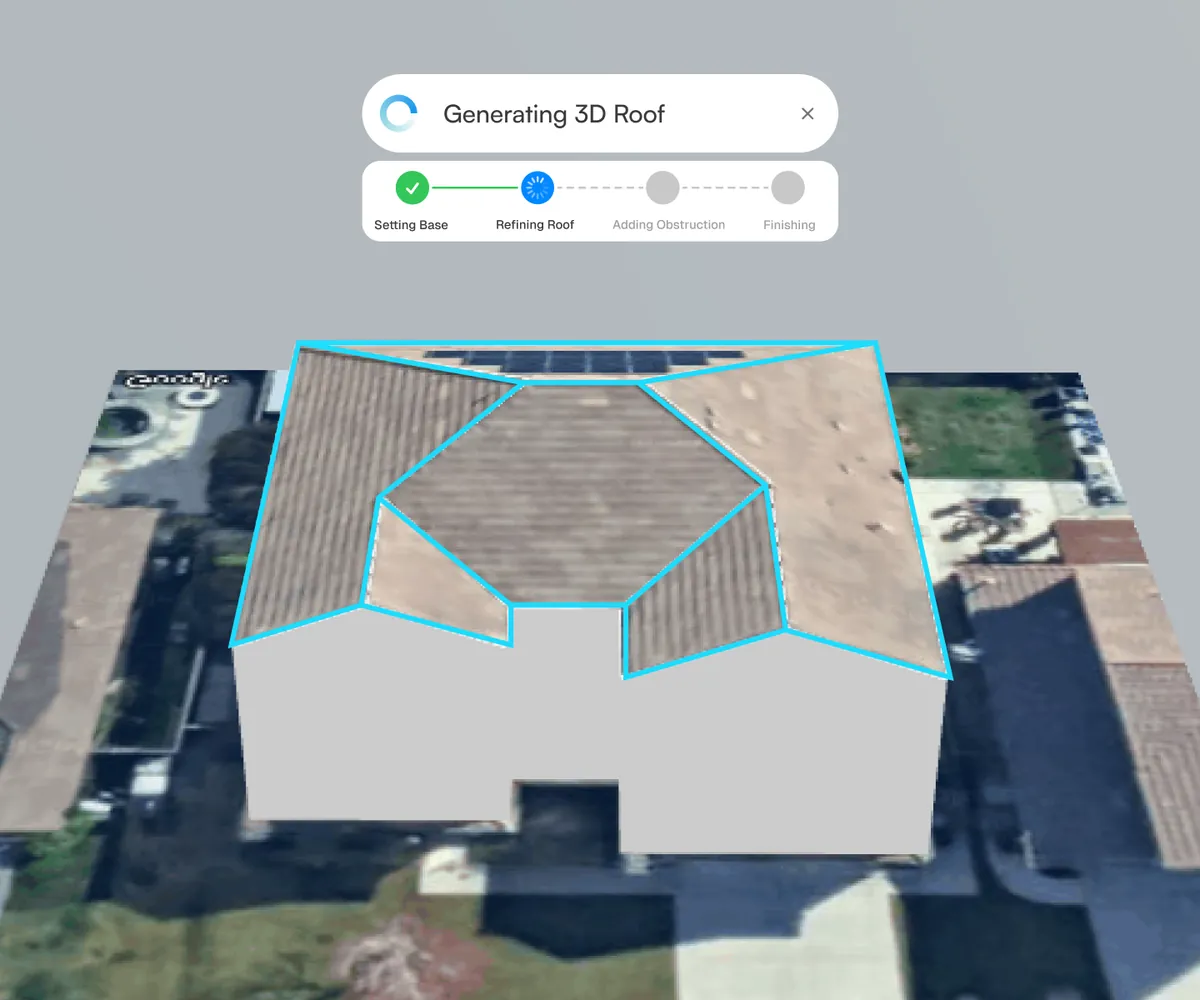
AI roof modelling in SurgePV. Screenshot: SurgePV.
The two halves of a solar deal
From lead management to solar design
One is a sales problem. The other is an engineering problem. Most solar businesses lose
time where the two meet.
Quickest Solar CRM is where the commercial side of your business lives: leads land, get routed
to a rep, turn into a subsidy-ready proposal, go out on WhatsApp, and get chased until they
close or die. It is deliberately fast and deliberately shallow on engineering, because a
salesperson standing in someone's driveway does not need a shading study.
SurgePV is where the technical side lives: the roof gets modelled, the modules get placed,
the shade gets simulated hour by hour, the yield gets forecast, and the economics get
worked out before anyone commits to a number. That work decides whether the deal you closed
is a deal worth having.
They are two separate products from two separate companies, both in the
Heaven Group. SurgePV Technologies Ltd
is registered in London and states on its about page that it was founded by the team
behind Heaven Designs. There is no automated data sync between SurgePV and
Quickest Solar CRM, so use each for the part of the job it was built for.
Why SurgePV
Why solar teams use SurgePV
Three things SurgePV is built to change about the way a technical solar project gets put
together.
One platform instead of four
SurgePV positions itself as a replacement for the usual stack: a CAD tool for the layout,
a simulation engine for the yield, a proposal builder for the client, and a spreadsheet
holding it all together. Design, shading, energy, financials and proposals sit in one
place, so nothing gets re-keyed between them.
Decisions before the site visit
The roof model comes from satellite imagery, so shading, irradiance and module placement
can be worked out before anyone gets on a ladder. Obstructions like trees, chimneys and
neighbouring buildings are modelled in, and a full-year shade simulation shows where the
losses actually land.
Numbers a financier will read
Yield is reported at P50, P75 and P90 confidence levels off TMY weather data with a full
loss chain behind it, and the economics come out as ROI, IRR, NPV, payback and LCOE
rather than a single savings figure. SurgePV states its reports are accepted in 18+
countries.
The workflow
Design, analyse, model, propose
Four steps, one platform, one set of project data carried through all of them.
01 — Design
Model the roof, place the modules
SurgePV builds a 3D roof model from satellite imagery, including dormers, multi-tilt
faces and awkward geometry; the company states most models generate in under 60
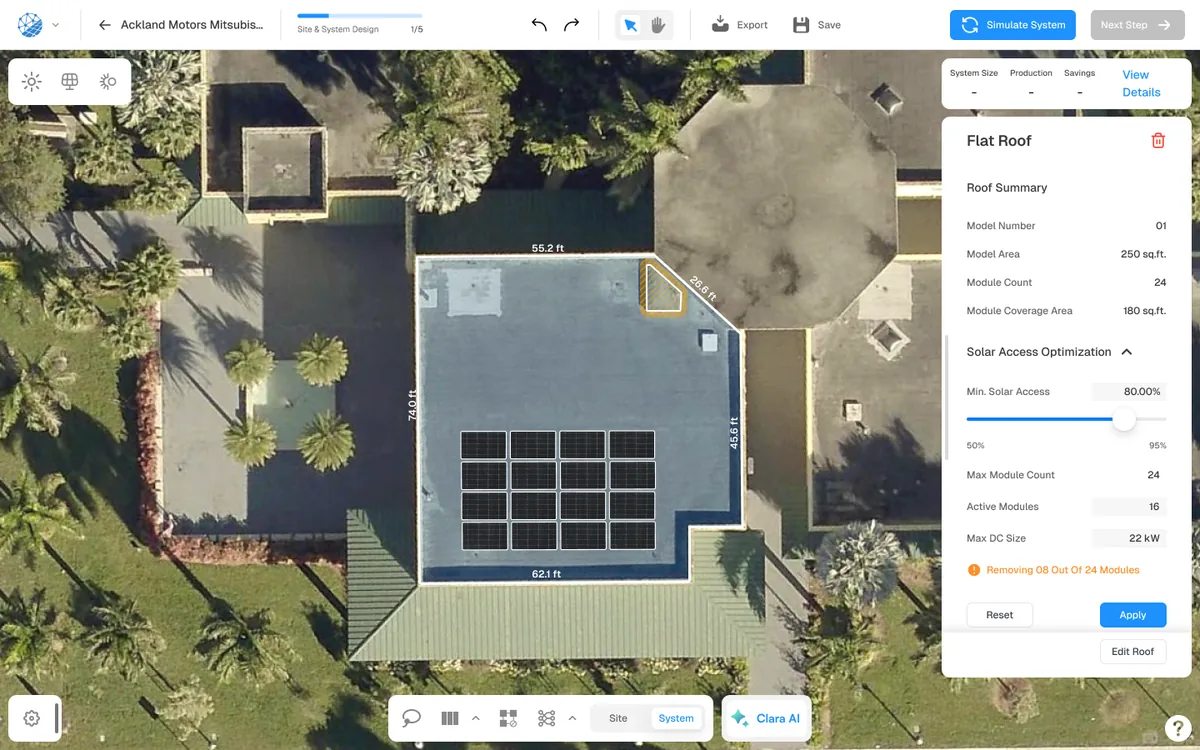
seconds. Modules are then placed automatically or by hand across flat, shed and
pitched surfaces, with code-compliant fire-safety pathways preserved.
AI roof geometry from Google 3D, Nearmap, Esri and Bing imagery
Dormers, multi-tilt and custom roof planes
Automatic or manual module placement, 2D and 3D views
Automatic string sizing and single-line diagram export
Module layout and solar-access optimisation. Screenshot: SurgePV.
02 — Analyse
See the shade before you see the site
An 8,760-hour annual simulation shows when and where shadows fall across the array,
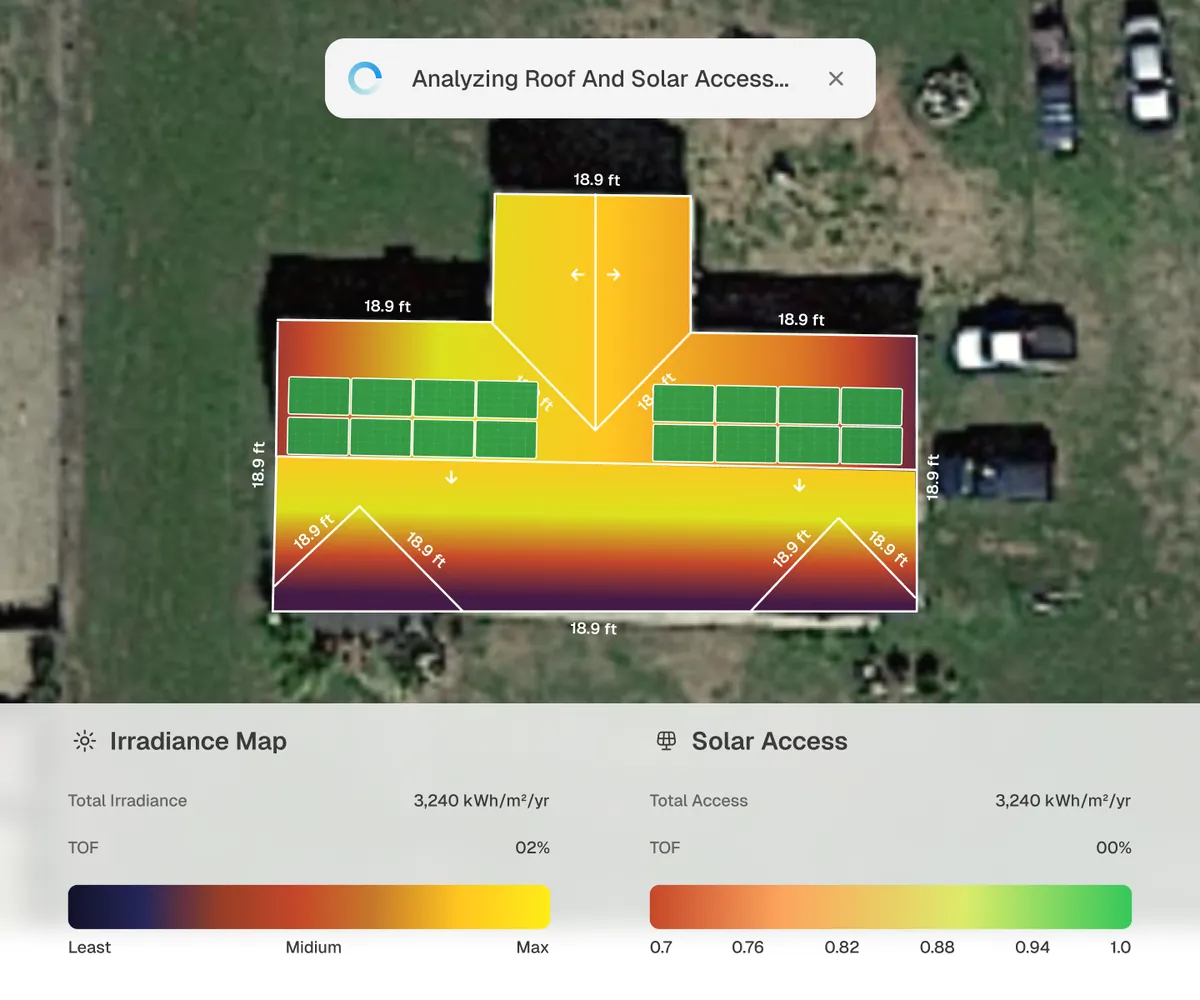
with trees, chimneys and neighbouring structures modelled as obstructions. Every roof
surface gets a colour-coded irradiance map, so the losses are visible per face rather
than averaged away.
Hour-by-hour shade simulation across a full year
Sun-path visualisation for any location
Colour-coded irradiance and solar-access maps per surface
Loss map: soiling, mismatch, wiring, temperature, inverter clipping
Irradiance and solar-access mapping. Screenshot: SurgePV.
03 — Model
Turn kilowatt-hours into a business case
Yield forecasts run off TMY weather data with the full loss chain applied and come out
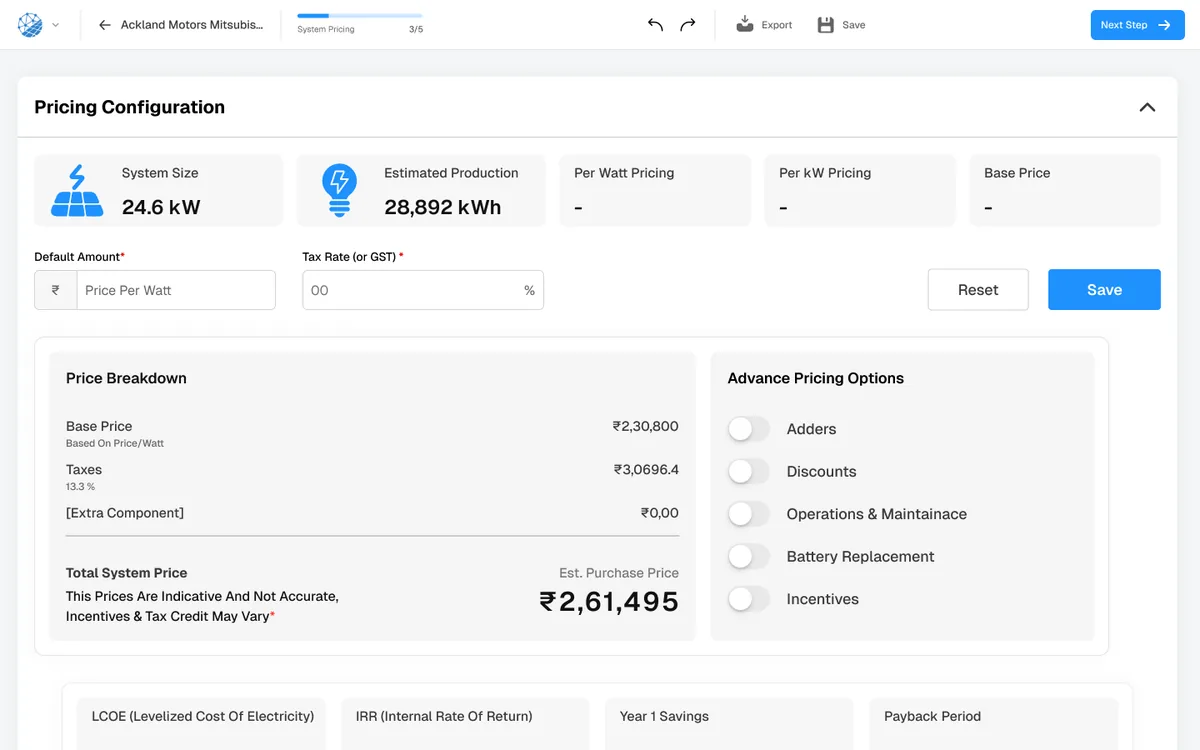
at P50, P75 and P90. The financial layer converts that into ROI, IRR, NPV, payback and
LCOE, with cash, loan, lease and PPA structures compared side by side in the local
currency and tariff.
P50 / P75 / P90 probabilistic yield reports
ROI, IRR, NPV, payback period and LCOE
Net metering, time-of-use and feed-in tariff modelling
Cash, loan, lease and PPA compared, multi-currency
Pricing configuration, LCOE, IRR and payback. Screenshot: SurgePV.
04 — Propose
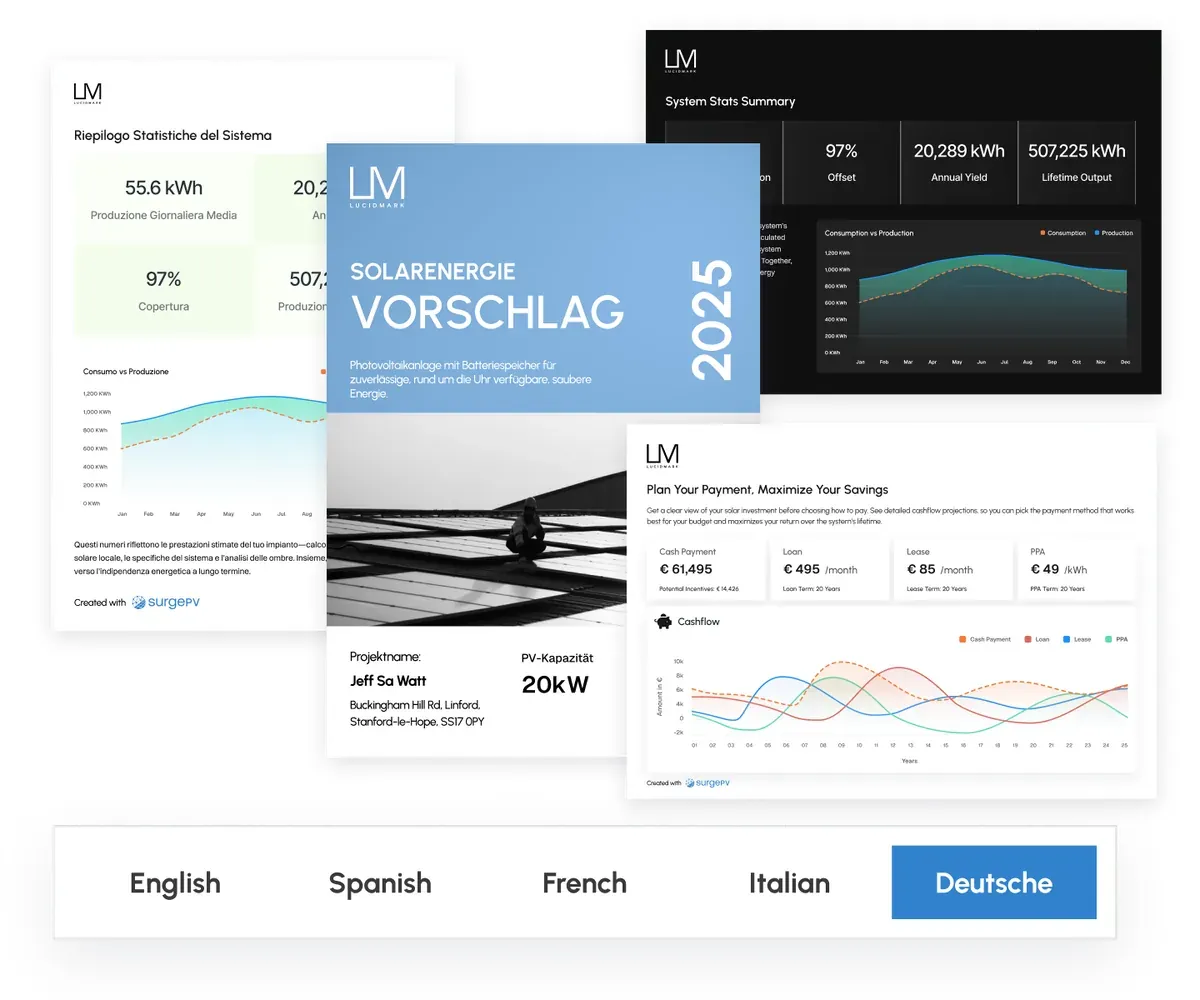
Send something the customer can actually read
The proposal is generated from the design rather than rebuilt in a slide deck. Bill of
materials, 3D visuals, monthly production and the financial summary are pulled straight
through, white-labelled to your brand, and shared as an interactive web link or a PDF.
Full white-label: your logo, colours and templates
Interactive web link or exported PDF
Bill of materials generated from the design
Multilingual proposals for international customers
SurgePV ships an in-app assistant called Clara AI. It works alongside the design view
with actions such as Smart-Trace, Smart-Fill, Map-Obstacles and Modify Design, so parts
of the modelling work can be described rather than drawn.
The six capabilities SurgePV publishes on its own product pages.
AI roof modelling
Satellite imagery becomes a 3D roof model covering dormers, multi-tilt faces and
complex geometry. SurgePV states most models generate in under 60 seconds.
Panel layout
Automatic or manual module placement across flat, shed and pitched roofs, with lasso
editing, measurements and fire-safety pathways.
Shading analysis
An 8,760-hour annual shade simulation with obstruction modelling and per-surface
irradiance maps for every roof face.
Energy simulation
TMY weather data and a full loss chain, soiling through inverter clipping, producing
P50 / P75 / P90 yield and a monthly breakdown.
Financial modelling
ROI, IRR, NPV, payback and LCOE, with tariff and incentive modelling and cash, loan,
lease and PPA compared side by side.
Proposals
White-label web or PDF proposals carrying the 3D visuals, auto-generated bill of
materials and financial summary, in multiple languages.
Capabilities and figures on this page are as published by SurgePV on
surgepv.com. Confirm anything
critical to your projects on the demo call.
How they fit together
Two tools. Two critical parts of the solar workflow.
One runs the sale. The other engineers the system. Neither one does the other's job, and
that is the point.
Sales workflow
Run your solar sales workflow
Capture leads from Meta Lead Ads, IndiaMART and web forms
Quickest Solar CRM and SurgePV are separate products. Nothing on this page describes an
integration, a data sync or a shared account between them.
Who it's for
Built for solar businesses
SurgePV describes its users in four groups, across every project size.
Solar installers & EPCs
Teams designing several projects a week who want the roof model, layout, single-line
diagram and bill of materials to come out of one tool.
Solar sales professionals
Reps who need an interactive, branded proposal with savings, tariff and payback laid out
clearly enough to be shared with a family or a board.
Designers & engineering teams
Designers running shading studies, string sizing and yield simulation who want the
bankable report and the client document generated from the same model.
OEMs, distributors & channel managers
Channel teams overseeing partner projects from design through install, with custom API
integrations and detailed site assessments.
ResidentialRooftop systems, roof to signed contract
CommercialC&I rooftops, flat-roof arrays and carports
Utility-scaleProjects from 1 MW to 1+ GW
FAQ
Questions before you book
Is SurgePV part of Quickest Solar CRM?
No. They are separate products from separate companies, both in the Heaven Group. SurgePV Technologies Ltd is registered in London and states on its about page that it was founded by the team behind Heaven Designs. Quickest Solar CRM is a product of Heaven Softech Pvt. Ltd. in Surat. SurgePV has its own team, pricing and login, and we introduce it here because the two products cover different halves of the same job.
Do Quickest Solar CRM and SurgePV sync data automatically?
No. There is no automated integration or data sync between the two platforms. You use Quickest Solar CRM to run the sales pipeline and SurgePV to design and analyse the system, and you move the numbers across yourself.
What does SurgePV actually do?
SurgePV builds a 3D roof model from satellite imagery, places modules on it, runs an 8,760-hour annual shading simulation, forecasts energy yield at P50/P75/P90 confidence levels, models the project economics (ROI, IRR, NPV, payback, LCOE) and turns all of it into a branded proposal as a web link or PDF.
Who is SurgePV built for?
SurgePV positions itself for solar installers and EPCs, solar sales professionals, solar designers and engineering teams, and OEMs, distributors and channel managers. It covers residential rooftops through commercial systems and utility-scale projects from 1 MW to 1+ GW.
Does SurgePV replace my design tools?
SurgePV describes itself as a consolidation of the design tool, simulation engine, proposal builder and spreadsheets into one browser-based platform. It does not replace AutoCAD for structural or architectural drawings. Check the details against your own workflow on the demo call.
What does SurgePV cost, and can I use it from India?
SurgePV is a cloud platform that runs in the browser, sells per user per year, and publishes local tariff support for 18+ countries including India. Pricing is published on surgepv.com, so ask on the demo call for the figure that applies to your team size and region.
Solar design software for modern solar businesses
Design, simulation, financial modelling and proposals in one platform, built for installers
and EPCs working from residential rooftops to utility-scale sites.
Book a personalised demo and see how SurgePV can help your team design, analyse and present
solar projects from one platform. The SurgePV team runs the call.
Request your SurgePV demo
The same details SurgePV asks for on its own demo page. Your request is logged against
SurgePV and tagged as a Quickest Solar CRM referral, and the SurgePV team follows up to
schedule a slot.
Request sent to SurgePV
The SurgePV team has your details and will reach out to schedule the demo. In the
meantime you can look around the product yourself.