

India’s solar industry is experiencing unprecedented growth, with installation companies competing fiercely for every customer. Yet many solar businesses are losing deals not because of pricing or quality, but because of something far more controllable: missed follow-ups, delayed proposals, and poor team coordination. If your sales team is still managing leads in spreadsheets and creating proposals manually, you’re leaving money on the table every single day.
Sales automation India has emerged as the game-changing solution that transforms how solar installation companies operate. By implementing automated workflows specifically designed for the solar industry, businesses across India are closing deals faster, nurturing more leads effectively, and empowering their teams to focus on what matters most—building relationships and closing sales.
This comprehensive guide walks you through everything you need to know about implementing sales automation in your solar business, from understanding core components to measuring ROI and overcoming common challenges.

Understanding Sales Automation for Solar Businesses in India
Sales automation refers to the use of software and technology to automate repetitive, time-consuming sales tasks, allowing your team to focus on high-value activities like customer conversations and deal closing. For solar businesses in India, this means automating everything from lead capture and follow-up sequences to proposal generation and team task assignment.
The Indian solar market presents unique challenges that make automation particularly valuable. With the government’s ambitious renewable energy targets and increasing consumer awareness, solar companies are receiving more inquiries than ever before. However, the average solar sales cycle in India spans 30-90 days, requiring multiple touchpoints and consistent follow-ups to convert prospects into customers.
Without automation, sales teams struggle with several critical pain points:
- Missed follow-ups: When managing dozens or hundreds of leads manually, it’s inevitable that some prospects fall through the cracks. A lead that doesn’t receive timely follow-up is a lost opportunity.
- Proposal creation bottlenecks: Creating customized solar proposals manually can take hours or even days, during which time prospects may engage with competitors who respond faster.
- Poor team coordination: Without centralized systems, team members don’t have visibility into who’s handling which leads, what stage each opportunity is in, or what actions need to be taken next.
- Lack of performance visibility: Manual processes make it nearly impossible to track real-time metrics like conversion rates, sales cycle length, or individual team member performance.
The cost of these inefficiencies is staggering. Research shows that companies that respond to leads within 5 minutes are 100 times more likely to connect than those who wait 30 minutes. In the competitive Indian solar market, speed and consistency aren’t just advantages—they’re necessities.
Sales automation addresses these challenges by creating systematic, repeatable processes that ensure no lead is forgotten, every proposal is delivered promptly, and your entire team operates with perfect coordination. The result is shorter sales cycles, higher conversion rates, and dramatically improved team productivity.
Core Components of Solar Sales Automation Systems
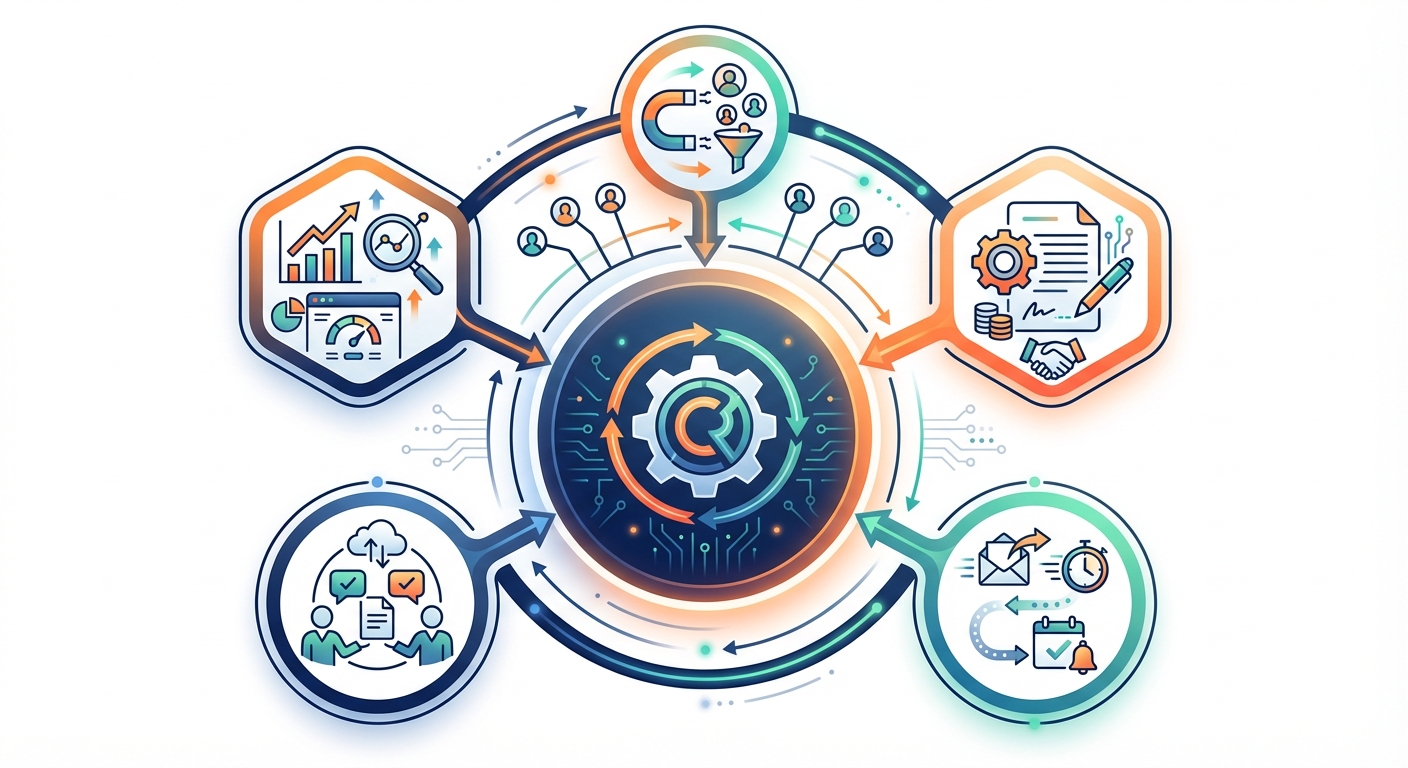
A comprehensive solar CRM India platform designed for automation includes several interconnected components that work together to streamline your entire sales operation. Understanding these core elements helps you evaluate solutions and plan your implementation strategy.
Lead Capture and Management Automation
Modern lead management systems automatically capture inquiries from multiple sources—your website, Facebook Ads, phone calls, walk-ins, and referrals—and funnel them into a centralized database. Advanced systems use lead scoring algorithms to automatically prioritize high-quality prospects based on criteria like project size, location, timeline, and engagement level.
Automated lead assignment rules ensure that new inquiries are immediately distributed to the right team member based on territory, expertise, or workload. This eliminates the delays that occur when leads sit in a general inbox waiting for manual assignment.
Automated Follow-Up Sequences and Reminders
Follow-up automation is perhaps the most impactful component of sales automation. The system automatically schedules and sends follow-up communications based on predefined triggers and timelines. For example, when a lead is marked as “proposal sent,” the system can automatically schedule follow-up emails at 2 days, 5 days, and 7 days, with customizable templates for each touchpoint.
Beyond email, modern systems support WhatsApp automation—particularly important in India where WhatsApp is the preferred communication channel for many customers. Automated reminders ensure your team never forgets to follow up, even when managing hundreds of active opportunities.
Proposal Generation and Delivery Automation
Proposal automation transforms what used to be a multi-hour process into a 60-second task. By maintaining template libraries with your branding, pricing structures, and solar-specific calculations, the system can generate professional proposals instantly based on customer requirements.
These proposals can be delivered immediately via email or WhatsApp, complete with tracking capabilities that notify you when prospects view the document. This speed advantage alone can be the difference between winning and losing deals in competitive situations.
Team Coordination and Task Assignment Tools
Automated task management ensures that every action item—from site visits to contract signing—is assigned to the right team member with clear deadlines. The system sends automatic notifications and reminders, creating accountability and ensuring nothing falls through the cracks.
Real-time dashboards provide complete visibility into team activities, allowing managers to identify bottlenecks and redistribute workload as needed.
Sales Pipeline Tracking and Analytics
Automation platforms continuously track every lead’s journey through your sales pipeline, automatically updating stages based on activities and outcomes. Real-time analytics dashboards provide instant visibility into key metrics like conversion rates, average deal size, sales cycle length, and individual team performance.
This data-driven approach enables continuous optimization of your sales process based on actual performance rather than gut feeling.
Integration Capabilities
Modern CRM integration India solutions connect with the tools you already use—Facebook Ads for lead capture, Pabbly Connect for workflow automation, your phonebook for contact management, and Excel for data import/export. These integrations eliminate manual data entry and ensure information flows seamlessly across your technology stack.
Automated Lead Management and Nurturing in India
Effective lead management is the foundation of successful sales automation. In the Indian solar market, where customers often research extensively before making decisions, a sophisticated lead nurturing strategy can dramatically improve conversion rates.
Capturing Leads from Multiple Sources Automatically
Your automation system should capture leads from every channel without manual intervention. When someone fills out a form on your website, responds to a Facebook Ad, or calls your business, their information should automatically flow into your CRM with all relevant context.
Advanced systems can parse incoming emails and even extract lead information from business cards photographed with a mobile app. The goal is to eliminate any manual data entry that creates delays and introduces errors.
Setting Up Lead Scoring and Qualification Workflows
Not all leads are created equal. Automated lead scoring assigns points based on factors like project size, budget indicators, timeline urgency, and engagement level. A lead requesting a 10kW commercial installation with a 30-day timeline scores higher than someone making a general inquiry about residential solar.
This scoring happens automatically in the background, ensuring your team always focuses on the highest-value opportunities first. You can configure qualification workflows that automatically move leads through stages like “New,” “Qualified,” “Proposal Sent,” and “Negotiation” based on specific criteria and actions.
Creating Automated Nurturing Sequences for Indian Solar Customers
The typical Indian solar customer needs education and reassurance before making a purchase decision. Automated nurturing sequences deliver targeted content at the right time to move prospects forward.
For example, a new lead might receive an immediate welcome message, followed by educational content about solar benefits after 2 days, customer testimonials after 5 days, and a limited-time consultation offer after 7 days. Each message is personalized with the prospect’s name and relevant details.
WhatsApp and Email Automation for Indian Market Preferences
Understanding regional communication preferences is crucial for lead management India success. While email works well for B2B communications and formal proposals, WhatsApp is often preferred for quick updates and informal conversations.
Your automation platform should support both channels, allowing you to send proposal links via WhatsApp for instant access while maintaining email records for documentation. Automated messages should be crafted in a tone that resonates with Indian customers—professional yet warm, informative yet concise.
Bulk Lead Import and Data Management
When implementing automation, you’ll need to migrate existing leads from spreadsheets or previous systems. Quality platforms support bulk import from Excel files, automatically mapping columns to the appropriate fields and flagging any data quality issues.
Ongoing data management features like duplicate detection, automatic field updates, and data validation rules ensure your database remains clean and actionable over time.
Proposal Automation: From Hours to Seconds
Proposal creation is often the biggest bottleneck in solar sales processes. Traditional methods involve gathering customer information, calculating system size and costs, creating documents in Word or PDF, adding branding and terms, and finally emailing the proposal—a process that can take 2-4 hours per proposal.
The Traditional Proposal Creation Bottleneck
Manual proposal creation creates multiple problems. First, the time investment means sales teams can only handle a limited number of opportunities. Second, delays between initial inquiry and proposal delivery give competitors time to engage the prospect. Third, manual processes introduce errors in calculations and formatting inconsistencies that undermine professionalism.
In fast-moving markets, the company that delivers a professional proposal first often wins the deal, regardless of minor price differences.
How Automated Proposal Generation Works for Solar Projects
Proposal automation systems maintain template libraries that include your branding, standard terms and conditions, product specifications, and pricing structures. When creating a proposal, the sales representative simply enters basic customer information and project requirements—system size, location, roof type, and any special considerations.
The system instantly generates a professional, branded proposal with accurate calculations for system capacity, energy generation estimates, cost breakdowns, financing options, and ROI projections. What used to take hours now takes 60 seconds.
Template Libraries and Brand Customization
Professional automation platforms allow you to create multiple proposal templates for different customer segments—residential, commercial, industrial—and different product offerings. Each template maintains your brand identity with logos, colors, and messaging while allowing customization for specific customer needs.
You can include dynamic content blocks that automatically populate based on project parameters, such as government subsidy information for residential customers or tax benefit details for commercial clients.
60-Second Proposal Delivery via WhatsApp and Email
Once generated, proposals can be delivered instantly through the customer’s preferred channel. Email delivery includes professional formatting and PDF attachments, while WhatsApp delivery provides a direct link that customers can view on their mobile devices immediately.
This instant delivery capability is particularly powerful during site visits or initial consultations. Imagine meeting a prospect, discussing their requirements, and sending a professional proposal before you even leave their property. This responsiveness creates a powerful impression and dramatically increases conversion rates.
Tracking Proposal Views and Engagement
Modern proposal systems include tracking capabilities that notify you when a prospect opens and views your proposal. This intelligence allows for perfectly timed follow-ups—you can call the prospect shortly after they’ve reviewed the proposal while it’s fresh in their mind, rather than following up blindly days later.
Engagement metrics also help you identify which proposals are generating interest and which might need revision or additional follow-up.
Setting Up Automated Follow-Up Workflows
Consistent follow-up is the difference between average and exceptional sales performance. Studies show that 80% of sales require five or more follow-up attempts, yet most salespeople give up after just two. Automation ensures your team maintains persistence without the mental burden of tracking every touchpoint manually.
Why Follow-Ups Are Critical in Solar Sales Cycles
Solar installations represent significant investments for customers, typically ranging from ₹60,000 for small residential systems to ₹50 lakhs or more for commercial projects. Customers need time to evaluate options, discuss with family or stakeholders, arrange financing, and build confidence in their decision.
During this consideration period, consistent follow-up keeps your company top-of-mind, addresses emerging questions, and demonstrates your commitment to customer service. Without systematic follow-up, prospects often go silent and eventually choose competitors who stayed more engaged.
Creating Customizable Reminder Sequences
Automated follow-up workflows are triggered by specific events or stages in your sales pipeline. For example, when a lead is marked as “Proposal Sent,” the system automatically creates a series of follow-up tasks:
- Day 2: Send email checking if they received the proposal and have any questions
- Day 5: WhatsApp message offering to schedule a call to discuss details
- Day 7: Phone call to address concerns and move toward decision
- Day 10: Email with customer testimonials and case studies
- Day 14: Final follow-up with limited-time consultation offer
Each touchpoint is automatically scheduled, and team members receive reminders to complete the actions. If a prospect responds positively at any stage, the workflow can be adjusted or paused to allow for natural conversation flow.
Email Template Automation for Different Stages
Quality automation platforms include template libraries for common follow-up scenarios. These templates are professionally written, personalized with customer details, and optimized for response rates. Sales representatives can use templates as-is or customize them for specific situations.
Templates should cover various scenarios: initial follow-up after inquiry, post-proposal follow-up, post-site-visit follow-up, addressing common objections, re-engagement of cold leads, and post-installation satisfaction checks.
Task Automation and Team Notifications
Beyond communication automation, the system creates task assignments for activities that require human action—scheduling site visits, preparing technical assessments, coordinating with installation teams, or following up on pending documentation.
Automated notifications ensure team members are immediately alerted to new tasks, approaching deadlines, and overdue items. Managers receive escalation notifications when tasks remain incomplete beyond acceptable timeframes.
Follow-Up Best Practices for Indian Solar Market
When configuring follow-up automation for the Indian market, consider cultural and practical factors. Avoid scheduling automated communications during major festivals or holidays. Use a mix of formal and friendly language that respects Indian business etiquette while building rapport.
Timing matters—avoid early morning or late evening communications. Mid-morning (10 AM – 12 PM) and late afternoon (4 PM – 6 PM) typically see the best engagement rates. For WhatsApp communications, keep messages concise and include clear calls-to-action.
Measuring Follow-Up Effectiveness and Conversion Rates
Your automation platform should track follow-up performance metrics: response rates to different message types, optimal timing for engagement, conversion rates at each stage, and the average number of touchpoints required to close deals.
This data allows continuous refinement of your follow-up sequences, helping you identify which messages resonate and which need improvement. Over time, you’ll develop highly optimized workflows that maximize conversion while minimizing wasted effort.
Team Coordination and Collaboration Automation
Poor team coordination is one of the most common complaints in growing solar businesses. When multiple team members interact with prospects—sales representatives, technical assessors, installation coordinators, and customer service—miscommunication and dropped handoffs become inevitable without proper systems.

Automated Task Assignment Based on Territory or Expertise
Automation platforms can route leads and tasks based on predefined rules. New residential leads in Mumbai automatically assign to your Mumbai residential specialist, while commercial inquiries in Bangalore route to your commercial team there. This geographic and expertise-based routing ensures customers always interact with the most qualified team member.
Load balancing rules can distribute leads evenly across team members to prevent any individual from becoming overwhelmed while others have capacity. When a team member is on leave, their leads can automatically reassign to designated backup personnel.
Real-Time Progress Monitoring and Visibility
Centralized dashboards provide complete visibility into every opportunity’s status. Managers can see at a glance which deals are progressing, which are stalled, and where intervention might be needed. Team members can view their colleagues’ activities to coordinate handoffs and avoid duplicate outreach.
This transparency eliminates the common scenario where multiple team members contact the same prospect with conflicting information, or worse, where no one follows up because everyone assumes someone else is handling it.
Mobile App Access for Field Sales Teams
Solar sales often happen in the field—at customer sites, trade shows, or partner locations. Mobile app access ensures your team can access customer information, create proposals, update lead status, and complete tasks from anywhere.
Field representatives can photograph site conditions, record customer requirements, and generate proposals on-site using their smartphones or tablets. This mobility dramatically accelerates the sales process and improves customer experience.
Notification Systems for Team Updates
Automated notifications keep everyone informed of important developments. When a proposal is viewed, the assigned sales representative receives an immediate notification. When a site visit is completed, the installation coordinator is automatically notified to begin planning. When a contract is signed, the entire team receives a celebration notification.
These real-time updates create a responsive, coordinated team environment where everyone knows what’s happening and can act accordingly.
Performance Tracking and Accountability
Automation platforms track individual and team performance metrics: leads handled, proposals sent, conversion rates, average deal size, and sales cycle length. This data creates natural accountability—team members can see how their performance compares to peers and identify areas for improvement.
Managers can use this data for coaching conversations, identifying training needs, and recognizing top performers. The transparency motivates excellence while providing objective data for performance reviews.
Reducing Coordination Overhead and Miscommunication
Without automation, teams spend significant time in coordination meetings, status update emails, and clarification conversations. Automated systems dramatically reduce this overhead by making information accessible to everyone who needs it, when they need it.
Team members spend less time asking “What’s the status of this lead?” or “Who’s handling this customer?” and more time on productive sales activities. The result is a more efficient, less frustrated team that closes more deals.
Implementation Roadmap for Indian Solar Companies
Successfully implementing sales automation requires a structured approach. Rushing the process or skipping steps often leads to poor adoption and disappointing results. This roadmap provides a proven framework for smooth implementation.
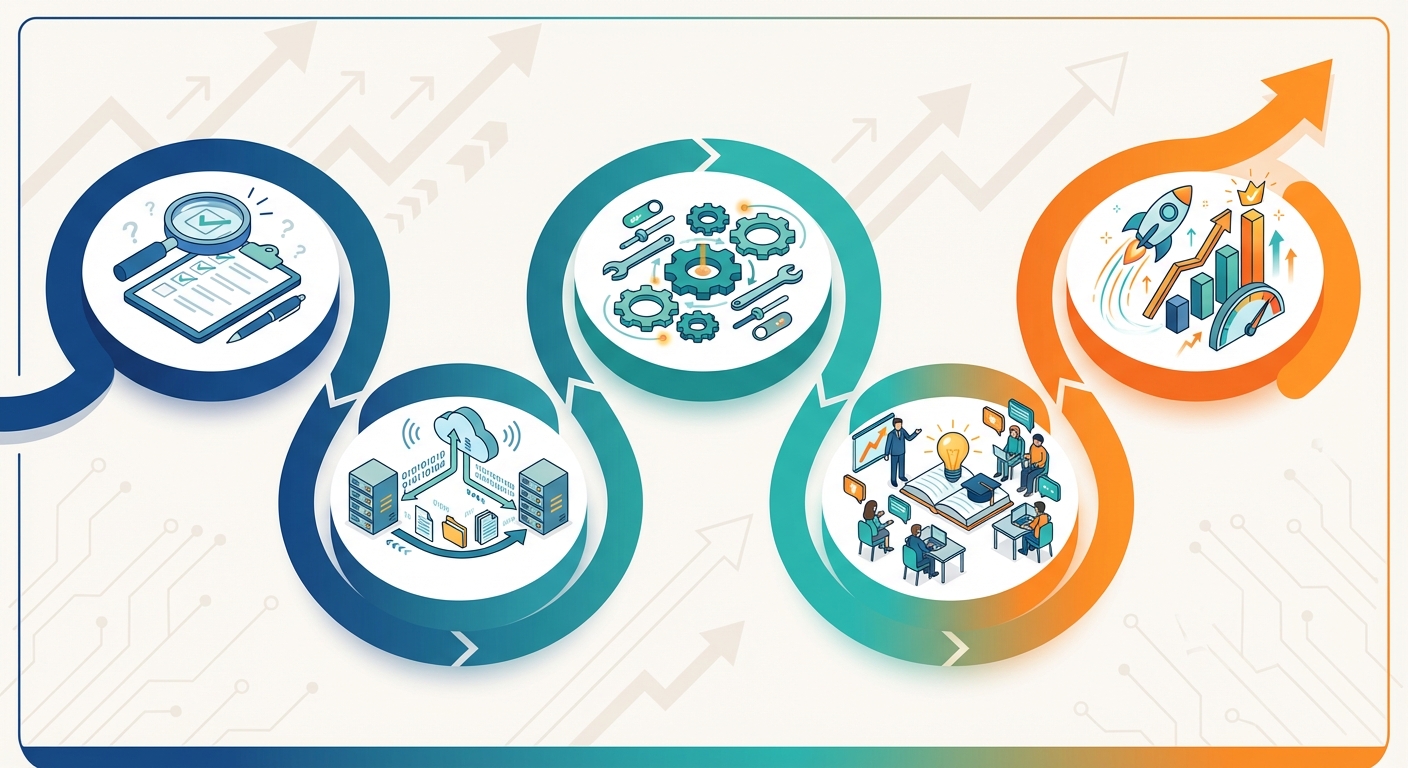
Phase 1: Assessment and Planning (Week 1-2)
Begin by documenting your current sales process in detail. Map out every step from lead capture to contract signing, identifying bottlenecks, pain points, and inefficiencies. Interview team members to understand their daily challenges and what they need from an automation system.
Define clear objectives for your automation initiative. Are you primarily focused on reducing proposal creation time? Improving follow-up consistency? Increasing team coordination? Prioritize your goals to guide platform selection and configuration decisions.
Evaluate your existing data. How many leads do you have in spreadsheets or old systems? What’s the data quality like? Plan for data cleanup before migration to ensure you start with a solid foundation.
Phase 2: Data Migration and Setup (Week 3-4)
Once you’ve selected your automation platform, begin the technical setup process. This includes configuring your account, setting up user profiles and permissions, and customizing the system to match your business structure.
Migrate existing customer and lead data from spreadsheets or previous systems. Most platforms support bulk import from Excel, but you’ll need to map your existing fields to the new system’s structure. Clean up duplicates and incomplete records during this process.
Set up your product catalog, pricing structures, and proposal templates. This foundational work enables the proposal automation features that will save your team significant time.
Phase 3: Workflow Configuration and Customization (Week 5-6)
Configure automated workflows based on your documented sales process. Set up lead assignment rules, follow-up sequences, task automation, and notification triggers. Start with simple workflows and add complexity as your team becomes comfortable with the system.
Customize email and WhatsApp templates for different scenarios. Ensure templates reflect your brand voice and include appropriate personalization fields. Test all templates thoroughly before activating automated sequences.
Configure your sales pipeline stages to match your actual process. Set up custom fields to capture information specific to solar projects—system size, roof type, financing preferences, installation timeline, etc.
Phase 4: Team Training and Adoption (Week 7-8)
Comprehensive training is critical for successful adoption. Conduct hands-on training sessions where team members practice common tasks: creating leads, generating proposals, updating pipeline stages, and completing follow-ups.
Create quick reference guides and video tutorials for common tasks. Designate “super users” within your team who receive advanced training and can provide peer support to colleagues.
Start with a pilot group if you have a large team. Have a small group use the system for 2-3 weeks, gather feedback, make adjustments, then roll out to the broader team. This phased approach reduces risk and allows you to refine processes before full deployment.
Phase 5: Testing and Optimization (Week 9-12)
Monitor system usage closely during the first month. Track adoption metrics: Are team members logging in daily? Are they using key features like proposal generation and follow-up automation? Identify any resistance or confusion and address it promptly.
Gather feedback regularly through team meetings or surveys. What’s working well? What’s frustrating? What features aren’t being used and why? Use this feedback to refine workflows and provide additional training where needed.
Begin analyzing performance data. Compare metrics before and after automation: proposal creation time, follow-up consistency, conversion rates, sales cycle length. Celebrate wins and share success stories to build momentum.
Timeline Expectations and Resource Requirements
A typical implementation for a small to medium solar company (5-20 team members) takes 8-12 weeks from initial planning to full adoption. Larger organizations or those with complex processes may need 3-4 months.
Resource requirements include a project champion (typically a sales manager or operations leader) who dedicates 10-15 hours per week during implementation, IT support for technical setup and integrations (if needed), and time for team training and practice.
Budget for ongoing optimization. The first 3-6 months after implementation involve continuous refinement as you learn what works best for your specific business and market.
Integration with Existing Tools and Platforms
Modern solar businesses use multiple tools and platforms. Your automation system should integrate seamlessly with these existing tools rather than requiring you to abandon investments you’ve already made.
Facebook Ads Integration for Lead Capture
Many Indian solar companies generate leads through Facebook advertising. Direct integration between Facebook Lead Ads and your CRM eliminates manual data entry and ensures instant follow-up.
When someone submits a lead form on Facebook, their information automatically flows into your CRM, triggers lead assignment rules, and initiates your automated follow-up sequence—all within minutes of their inquiry. This speed dramatically improves conversion rates compared to manual processes where leads might sit for hours or days.
Pabbly Connect for Workflow Automation
Pabbly Connect serves as a bridge between your CRM and hundreds of other applications. You can create automated workflows that span multiple platforms—for example, when a deal is marked as won in your CRM, automatically create a project in your project management tool, send a notification to your installation team on Slack, and add the customer to your email marketing platform.
These cross-platform automations eliminate manual data transfer and ensure information flows seamlessly across your entire technology stack.
Phonebook and Contact Management Integration
Integration with your mobile phonebook allows you to quickly add contacts to your CRM by simply selecting them from your phone. When a customer calls, their information automatically appears on your screen if they’re in your CRM, providing instant context for the conversation.
This integration is particularly valuable for field sales teams who often communicate with customers via phone and need quick access to customer history and notes.
Excel Import/Export Capabilities
Despite the move toward automation, Excel remains a critical tool for many business processes. Quality CRM platforms support easy import and export of data in Excel format, allowing you to perform bulk updates, create custom reports, or share data with stakeholders who don’t have CRM access.
Regular exports also serve as data backups, providing peace of mind that your valuable customer information is protected.
API Access for Custom Integrations
For businesses with unique requirements or proprietary systems, API access enables custom integrations. Your development team or a technical partner can build connections between your CRM and specialized tools like solar design software, accounting systems, or inventory management platforms.
API documentation and developer support vary by platform, so evaluate these capabilities if custom integrations are important for your business.
Data Security Considerations
When integrating multiple systems, data security becomes paramount. Ensure your automation platform uses industry-standard security protocols like TLS 1.2 encryption for data transmission and 256-bit AES encryption for data storage.
Review the security practices of any third-party integration tools you use. Understand where your data is stored, who has access, and what backup and recovery procedures are in place. For businesses handling sensitive customer financial information, compliance with data protection regulations is essential.
Measuring ROI and Success Metrics
Implementing sales automation requires investment in software, training, and change management. Measuring return on investment helps justify this investment and guides ongoing optimization efforts.
Key Performance Indicators for Sales Automation
Track these essential metrics before and after automation implementation:
- Lead response time: How quickly does your team make first contact with new leads?
- Proposal creation time: How long does it take to generate and send a proposal?
- Follow-up consistency: What percentage of leads receive timely follow-ups at each stage?
- Conversion rate: What percentage of leads ultimately become customers?
- Sales cycle length: How many days from initial inquiry to contract signing?
- Average deal size: What’s the average value of closed deals?
- Team productivity: How many opportunities can each team member manage simultaneously?
- Customer satisfaction: How do customers rate their experience with your sales process?
Time Savings: Proposal Creation and Follow-Ups
Calculate time savings by comparing before and after scenarios. If proposal creation previously took 3 hours and now takes 60 seconds, you’re saving 2 hours and 59 minutes per proposal. Multiply this by the number of proposals your team creates monthly to quantify total time savings.
Similarly, automated follow-ups eliminate the time spent manually tracking who needs follow-up, composing messages, and scheduling reminders. A team creating 50 proposals monthly and saving 3 hours per proposal gains 150 hours—nearly four full work weeks—to invest in higher-value activities.
Conversion Rate Improvements
Even modest conversion rate improvements generate significant revenue impact. If your previous conversion rate was 15% and automation helps you achieve 20%, you’re closing 33% more deals from the same lead volume.
For a company generating 100 qualified leads monthly with an average deal size of ₹2 lakhs, improving conversion from 15% to 20% means 5 additional deals per month—an extra ₹10 lakhs in monthly revenue or ₹1.2 crores annually.
Sales Cycle Reduction Metrics
Faster sales cycles mean you close more deals in the same timeframe and improve cash flow. If automation reduces your average sales cycle from 60 days to 45 days, you can complete 8 sales cycles per year instead of 6—a 33% increase in throughput.
Track sales cycle length by pipeline stage to identify where automation has the greatest impact. You might find that proposal delivery time decreased dramatically while negotiation length remained unchanged, suggesting where to focus further optimization efforts.
Team Productivity Gains
Measure how many active opportunities each team member can manage effectively. Before automation, a sales representative might handle 20-30 active leads. With automation handling routine tasks and follow-ups, that same person might effectively manage 50-75 opportunities.
This productivity gain means you can grow revenue without proportionally increasing headcount, improving profitability and scalability.
Real-Time Analytics Dashboard for Tracking Performance
Modern automation platforms provide real-time dashboards that display all these metrics in visual, easy-to-understand formats. Rather than spending hours compiling reports from spreadsheets, managers can view current performance at a glance and drill down into specific areas of concern.
This real-time visibility enables faster decision-making and more agile responses to market changes or performance issues.
Common Challenges and Solutions for Indian Solar Businesses
While sales automation delivers significant benefits, implementation isn’t without challenges. Understanding common obstacles and their solutions helps you navigate the transition successfully.
Overcoming Resistance to Change and Adoption Barriers
Team members comfortable with existing processes often resist new systems, fearing complexity or job security concerns. Address this by involving team members in the selection and configuration process, demonstrating how automation makes their jobs easier rather than replacing them.
Emphasize that automation handles tedious tasks, freeing them to focus on relationship-building and closing deals—the aspects of sales most people find rewarding. Share success stories from early adopters to build enthusiasm.
Handling Data Quality and Migration Issues
Poor data quality in existing systems can complicate migration. Leads with missing information, duplicates, or inconsistent formatting create problems in automated workflows.
Invest time in data cleanup before migration. Use tools to identify and merge duplicates, standardize formatting, and fill in missing critical fields. Establish data quality standards going forward, using required fields and validation rules to maintain clean data.
Customizing Automation for Regional Differences Across India
India’s diversity means sales approaches that work in Mumbai might not resonate in Jaipur. Language preferences, communication styles, and decision-making processes vary significantly across regions.
Configure your automation to accommodate these differences. Create region-specific email templates, adjust follow-up timing based on local business practices, and allow team members to customize automated messages while maintaining brand consistency.
Balancing Automation with Personal Touch
Over-automation can make interactions feel impersonal, damaging relationships. The goal is to automate routine tasks while preserving human connection for meaningful interactions.
Use automation for scheduling, reminders, and information delivery, but ensure actual conversations—whether by phone, video call, or in-person meetings—remain personal and relationship-focused. Configure automated messages to sound natural and conversational rather than robotic.
Scaling Automation as Business Grows
As your business grows, your automation needs evolve. Workflows that worked for a 5-person team might not scale to 50 people. Plan for scalability by choosing platforms that support growth and regularly reviewing workflows to ensure they remain efficient.
Add complexity gradually. Start with basic automation and layer in advanced features as your team’s sophistication increases. This approach prevents overwhelming users while continuously improving efficiency.
Troubleshooting Common Implementation Issues
Common technical issues include integration failures, notification overload, and workflow logic errors. Establish a clear support process where team members can report issues and receive prompt assistance.
Maintain documentation of your workflow configurations so you can troubleshoot problems systematically. Work closely with your platform’s support team during the first few months to resolve issues quickly and learn best practices.
Choosing the Right Sales Automation Platform
The success of your automation initiative depends heavily on selecting the right platform for your specific needs. Not all CRM and automation solutions are created equal, particularly for the unique requirements of solar businesses in India.
Solar-Specific vs. General CRM Platforms
General-purpose CRMs like Salesforce and Zoho CRM offer broad functionality but require significant customization to address solar industry needs. You’ll need to configure custom fields for solar-specific data, create proposal templates from scratch, and build workflows without industry-specific guidance.
Solar-specific platforms like QuickEst come pre-configured with solar industry workflows, proposal templates designed for solar projects, and features like 60-second proposal generation that understand solar business requirements out of the box. This specialization dramatically reduces implementation time and delivers immediate value.
For Indian solar companies, platforms built with understanding of the Indian market—including WhatsApp integration, regional language support, and local business practices—provide additional advantages over international platforms designed primarily for Western markets.
Essential Features for Indian Solar Companies
Prioritize these capabilities when evaluating platforms:
- Fast proposal generation: Can you create professional solar proposals in minutes rather than hours?
- WhatsApp integration: Does the platform support WhatsApp communication, critical for Indian market engagement?
- Mobile accessibility: Can field teams access full functionality from smartphones and tablets?
- Automated follow-ups: Does the system support customizable follow-up sequences with email and WhatsApp?
- Lead management: Can you capture leads from multiple sources and automatically assign them based on rules?
- Team collaboration: Does the platform provide visibility and coordination tools for multi-person teams?
- Real-time analytics: Can you view current performance metrics without manual report compilation?
- Integration capabilities: Does it connect with Facebook Ads, Excel, and other tools you use?
- Data security: Does it use enterprise-grade encryption and security protocols?
Pricing Models and Cost Considerations
CRM platforms typically use subscription pricing models—monthly or annual fees per user. CRM pricing varies widely based on features, user count, and support levels.
When evaluating costs, consider total cost of ownership including implementation, training, customization, and ongoing support—not just the subscription fee. A platform with higher subscription costs but lower implementation requirements might be more cost-effective than a cheaper option requiring extensive customization.
Look for transparent pricing without hidden fees. Some platforms charge extra for features like API access, additional storage, or premium support. Understand the complete cost structure before committing.
Many platforms offer tiered pricing with different feature sets at each level. Start with a plan that meets your current needs with room to grow, rather than paying for advanced features you won’t use immediately.
Vendor Evaluation Criteria
Beyond features and pricing, evaluate vendors on these factors:
- Industry expertise: Does the vendor understand solar business challenges and workflows?
- Implementation support: What assistance do they provide during setup and configuration?
- Training resources: Are comprehensive training materials, videos, and documentation available?
- Customer support: What support channels are available (phone, email, chat) and during what hours?
- Update frequency: How often does the platform receive new features and improvements?
- Customer reviews: What do existing customers say about their experience?
- Data portability: Can you export your data if you decide to switch platforms later?
Free Trial and Testing Approaches
Most quality platforms offer free trials or demo accounts. Use these opportunities to test functionality with your actual workflows and data. Create sample leads, generate proposals, set up follow-up sequences, and evaluate the user experience.
Involve multiple team members in testing—sales representatives, managers, and administrators. Each role interacts with the system differently, and you need feedback from all perspectives.
Prepare a testing checklist based on your priority requirements. Systematically evaluate each feature rather than casually exploring the platform. This structured approach ensures you make informed decisions based on actual capabilities rather than sales presentations.
Support and Training Availability in India
For Indian solar companies, local support availability can be crucial. Platforms with India-based support teams understand local business practices and can provide assistance during Indian business hours.
Evaluate training resources available in languages your team speaks. While English is widely used in Indian business, some team members might benefit from training materials in Hindi or regional languages.
Consider the vendor’s presence in India. Do they have local offices or partners who can provide on-site assistance if needed? For larger implementations, local support can significantly smooth the process.
Frequently Asked Questions About Solar Sales Automation in India
How long does implementation take?
Implementation timelines vary based on business size and complexity. A small solar company with 5-10 team members can typically implement basic automation in 4-6 weeks, including data migration, configuration, and training. Larger organizations or those with complex workflows might need 8-12 weeks for full implementation. The key is starting with core functionality and adding advanced features progressively rather than trying to implement everything simultaneously.
What is the typical ROI timeline?
Most solar companies begin seeing ROI within 2-3 months of implementation. Initial benefits come from time savings in proposal creation and improved follow-up consistency. As team adoption increases and workflows optimize, benefits compound. By 6 months, companies typically report significant improvements in conversion rates and sales cycle length. Full ROI—where cumulative benefits exceed total implementation and subscription costs—usually occurs within 6-12 months depending on business size and automation scope.
Can automation work for small solar companies?
Absolutely. In fact, small companies often benefit most from automation because they have limited resources and can’t afford to waste time on manual processes. Modern platforms offer affordable pricing tiers suitable for small businesses, and the efficiency gains help small teams compete effectively against larger competitors. A 3-person solar company can operate with the efficiency of a 10-person team using proper automation, enabling growth without proportional increases in overhead.
How much training is required?
Basic proficiency with modern CRM platforms typically requires 4-8 hours of training per team member, spread over 1-2 weeks. This includes initial orientation, hands-on practice with common tasks, and follow-up sessions to address questions. Advanced users who will configure workflows and manage the system need additional training—typically 12-16 hours. Quality platforms provide video tutorials, documentation, and ongoing support to supplement formal training. Most team members become comfortable with daily tasks within 2-3 weeks of regular use.
What happens to existing customer data?
Existing customer data migrates to your new automation platform through bulk import processes. Most platforms support Excel import, allowing you to transfer leads, contacts, and deal information from spreadsheets or previous systems. During migration, you’ll map your existing data fields to the new system’s structure. It’s important to clean and standardize data before migration to ensure quality. After migration, your historical customer information remains accessible, and you can continue building on existing relationships without losing context or history.
Is mobile access included?
Most modern CRM and automation platforms include mobile apps for iOS and Android as part of their standard offering, not as an additional cost. Mobile access is essential for solar sales teams who spend significant time in the field conducting site visits and meeting customers. Mobile apps typically provide full functionality—creating leads, generating proposals, updating pipeline stages, completing tasks, and viewing analytics—allowing team members to work effectively from anywhere. Some platforms also offer progressive web apps that work through mobile browsers without requiring app installation.
Transform Your Solar Business with Sales Automation
The Indian solar market is at an inflection point. Government initiatives, declining technology costs, and increasing environmental awareness are driving unprecedented demand. In this environment, the solar companies that will thrive are those that can respond quickly, follow up consistently, and operate with maximum efficiency.
Sales automation India is no longer a luxury for large enterprises—it’s a competitive necessity for solar businesses of all sizes. The companies implementing automation today are closing more deals, growing faster, and building sustainable competitive advantages over competitors still relying on manual processes.
The implementation journey requires investment in time, resources, and change management. But the returns—measured in time savings, conversion rate improvements, team productivity gains, and revenue growth—far exceed the costs. More importantly, automation frees your team to focus on what they do best: building relationships, solving customer problems, and growing your business.
Whether you’re a small installation company looking to compete more effectively or an established EPC seeking to scale operations, the right sales automation platform can transform your business. The question isn’t whether to automate, but how quickly you can implement the systems that will drive your success in 2026 and beyond.
QuickEst provides solar-specific automation designed for Indian businesses, with features like 60-second proposal generation, WhatsApp integration, and automated follow-up workflows that address the unique challenges of the Indian solar market. Explore the FREE PLAN – ₹0 to experience how automation can transform your sales process, or upgrade to the PRO PLAN – ₹6999 Per User / Year for advanced features that scale with your business.
Ready to eliminate missed follow-ups, accelerate proposal delivery, and empower your team with the tools they need to succeed? Contact us to discuss how sales automation can drive growth for your solar business.
The future of solar sales in India is automated, efficient, and customer-focused. The companies that embrace this future today will lead the market tomorrow.