

In the competitive solar industry of 2026, your team’s ability to work together seamlessly can make the difference between closing deals and losing them to faster competitors. When your sales representatives, project managers, and support staff operate in silos, leads fall through the cracks, follow-ups get missed, and valuable customer insights remain trapped in individual inboxes. Team collaboration in your solar CRM transforms this chaos into coordinated action, enabling your business to respond faster, close more deals, and deliver exceptional customer experiences.
This comprehensive tutorial walks you through the exact steps to enable and optimize team collaboration features in your solar CRM. Whether you’re managing a small installation team or scaling a large solar EPC company across India, you’ll learn how to assign tasks effectively, monitor team progress in real-time, share critical insights, and create workflows that help your team close deals faster. By the end of this guide, you’ll have a fully collaborative CRM system that turns your sales team into a coordinated revenue-generating machine.
Why Team Collaboration Matters in Solar CRM Systems
Poor team coordination costs solar businesses more than just missed opportunities. When your sales team lacks visibility into what their colleagues are doing, multiple representatives might contact the same lead, creating confusion and damaging your professional image. A study by the Solar Energy Industries Association found that companies with strong team collaboration practices close deals 27% faster than those with fragmented communication systems.

In the Indian solar market, where response time often determines who wins the contract, team collaboration becomes even more critical. When a potential customer submits an inquiry through your website or Facebook Ads integration, your CRM should immediately assign that lead to the right team member, notify relevant stakeholders, and trigger a coordinated follow-up sequence. Without proper team collaboration tools, that lead might sit unattended for hours or days while your competitor sends a proposal within minutes.
The financial impact is substantial. Solar companies using collaborative CRM systems report 34% higher lead-to-customer conversion rates and 41% improvement in team productivity. When your entire team can see the sales pipeline, track each other’s activities, and share successful strategies, everyone performs better. Your junior sales representatives learn from top performers, managers can identify bottlenecks before they become problems, and your business gains the agility to adapt quickly to market changes.
Beyond revenue metrics, effective team collaboration in your solar CRM creates a better work environment. Sales professionals feel supported rather than isolated, new team members onboard faster with access to shared knowledge, and your entire organization operates with transparency and accountability. This foundation of collaborative efficiency is what separates growing solar businesses from those struggling to scale.
1. Set Up Your Team Structure and User Roles
The foundation of effective team collaboration starts with properly structuring your team within your CRM system. Begin by creating individual user accounts for each team member who will interact with leads, customers, or sales data. In QuickEst, this process takes just minutes and allows you to define exactly who has access to what information.
Start by identifying the different roles within your solar business. Most solar companies have at least three distinct user types: sales representatives who handle day-to-day customer interactions, sales managers who oversee team performance and strategy, and administrators who manage system settings and integrations. Each role requires different permission levels to maintain both efficiency and data security.
For sales representatives, configure permissions that allow them to create and edit their own leads, generate proposals, schedule follow-ups, and view team calendars. They should be able to see leads assigned to them and access shared resources like proposal templates and product information. However, they typically shouldn’t have access to delete company-wide data or modify system settings that could disrupt team workflows.
Sales managers need broader visibility to monitor team performance and identify coaching opportunities. Grant them access to view all team members’ leads, track conversion metrics, generate performance reports, and reassign leads when necessary. This oversight capability enables managers to spot when a team member is overwhelmed and needs support, or when a high-value lead requires senior attention.
Administrator roles should be reserved for trusted team members who handle technical setup and system maintenance. These users can manage integrations with tools like Pabbly Connect, customize proposal templates, import bulk leads from Excel, and configure automation rules that affect the entire team. Limiting administrator access prevents accidental changes that could disrupt your sales operations.
When setting up your team structure, consider your organizational hierarchy and sales territories. If your solar business operates across multiple regions in India, you might create regional teams within your CRM, allowing managers to focus on their geographic area while still maintaining company-wide visibility. This structure supports both local autonomy and centralized oversight, essential for scaling solar businesses.
Document your permission structure clearly and communicate it to your team. When everyone understands who can do what within the system, you avoid confusion and ensure that team collaboration flows smoothly. As your business grows and roles evolve, revisit these permissions quarterly to ensure they still align with your operational needs.
2. Configure Task Assignment and Delegation Features
Once your team structure is in place, the next critical step for enabling team collaboration is configuring how tasks and leads get assigned to team members. Effective task assignment ensures that every lead receives prompt attention from the right person, preventing the common problem of leads languishing unattended in your pipeline.
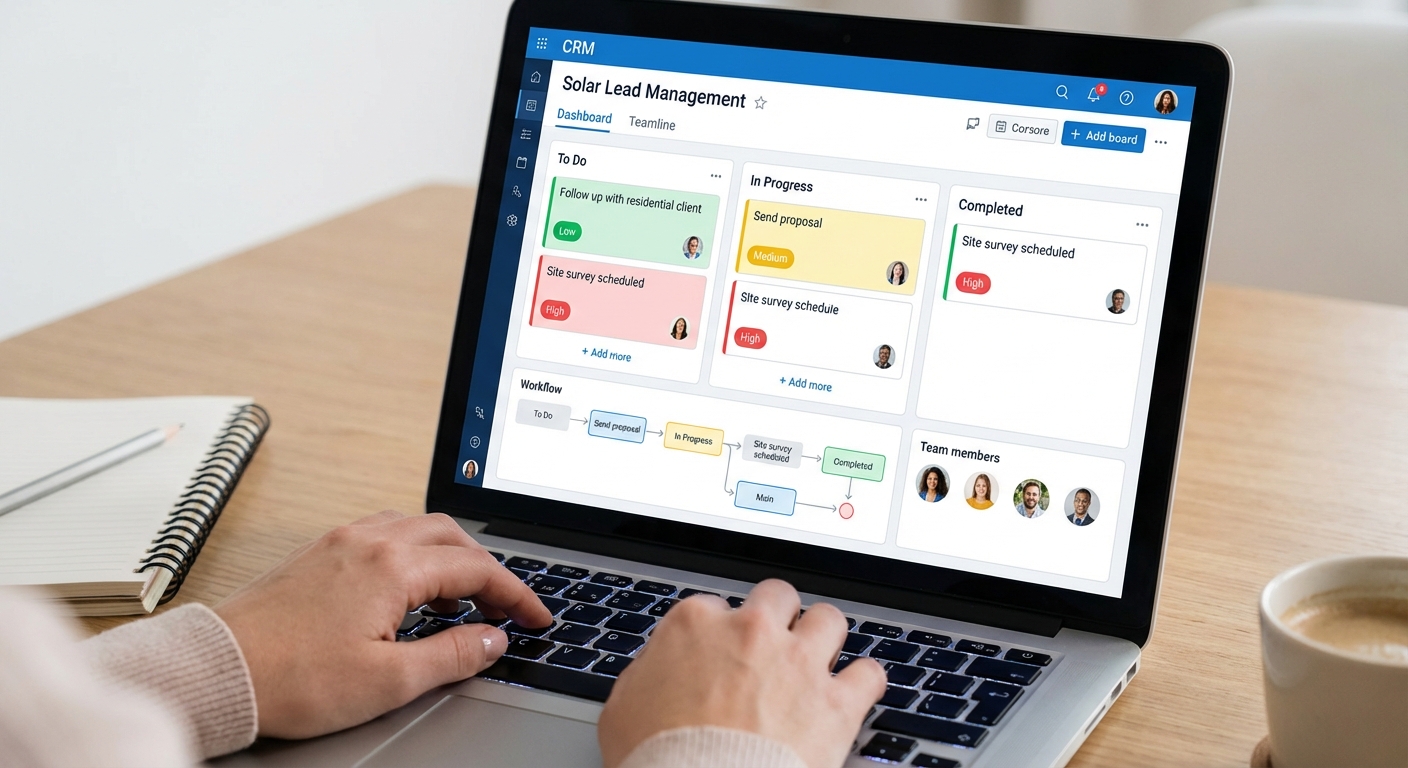
Begin by establishing clear assignment rules based on lead source and characteristics. For example, leads from Facebook Ads might automatically assign to your digital marketing specialist, while referrals from existing customers could go to your senior sales representative who excels at relationship-based selling. QuickEst allows you to create these automated assignment rules, eliminating the manual work of sorting through new inquiries each morning.
For residential solar leads, consider implementing round-robin assignment to distribute opportunities evenly across your sales team. This approach prevents any single representative from becoming overwhelmed while ensuring fair opportunity distribution. Commercial and industrial leads, which typically require more technical expertise, might route directly to your experienced commercial sales specialists regardless of current workload.
Task delegation goes beyond initial lead assignment. Create workflows for the entire customer journey, from first contact through proposal delivery and follow-up. When a sales representative schedules a site survey, the system should automatically create tasks for the technical team to conduct the survey and for the sales rep to follow up afterward. This interconnected task system ensures nothing falls through the cracks during team collaboration.
Set clear deadlines for each task type to maintain urgency and accountability. First response to a new lead should happen within 15 minutes during business hours, proposal delivery within 24 hours of site survey completion, and follow-up calls within 48 hours of proposal delivery. Your CRM should send automatic reminders as these deadlines approach, keeping your team on track without constant manual oversight.
Use task priorities to help team members focus on high-value activities. Mark hot leads from qualified prospects as high priority, while informational inquiries can be standard priority. This visual prioritization helps your sales team make smart decisions about where to invest their time, especially during busy periods when they’re juggling multiple opportunities.
Monitor task completion rates across your team to identify both top performers and those who might need additional support. If you notice a team member consistently missing deadlines or leaving tasks incomplete, it signals a need for coaching or workload adjustment. This data-driven approach to CRM implementation transforms task management from guesswork into strategic team development.
Create a shared task calendar that displays all team activities, allowing members to see when colleagues are conducting site surveys, delivering presentations, or following up with key accounts. This visibility prevents scheduling conflicts and enables team members to provide backup support when someone is out of the office or handling an emergency.
3. Enable Real-Time Progress Monitoring and Dashboards
Visibility drives accountability and performance improvement. Real-time progress monitoring transforms your solar CRM from a simple database into a powerful team collaboration platform that keeps everyone aligned and informed. When your entire team can see pipeline progress, individual performance metrics, and company goals, they naturally coordinate better and push toward shared objectives.
Configure your main dashboard to display key metrics that matter most to your solar business. Essential metrics include total leads in pipeline, conversion rate by stage, average time to proposal delivery, proposal acceptance rate, and revenue forecast for the current month and quarter. These numbers should update in real-time as team members log activities, ensuring everyone works from current information rather than outdated reports.
Create individual performance dashboards for each sales representative showing their personal metrics alongside team averages. This comparison motivates high performers to maintain their edge while helping struggling team members identify specific areas for improvement. Display metrics like leads assigned, proposals sent, follow-up completion rate, and deals closed. The transparency of these dashboards fosters healthy competition and continuous improvement.
For sales managers, set up team overview dashboards that aggregate performance across all representatives. These dashboards should highlight both successes to celebrate and bottlenecks requiring intervention. If you notice that proposals are being sent quickly but acceptance rates are low, it signals a need for proposal quality improvement or pricing strategy review. This level of insight is impossible without proper team collaboration tools.
QuickEst’s mobile app extends dashboard access beyond the office, allowing team members to check progress during site visits, commutes, or while working remotely. This mobile accessibility ensures that your team stays connected and informed regardless of location, particularly valuable for solar businesses with field teams conducting installations and surveys across different cities in India.
Customize dashboard views for different roles and responsibilities. Your technical team might need visibility into survey schedules and installation timelines, while your finance team focuses on proposal values and payment collection rates. By tailoring dashboards to each team’s needs, you ensure that everyone has the information they need without overwhelming them with irrelevant data.
Schedule automated dashboard reports to be sent to your team daily or weekly via email. These reports create regular touchpoints for reviewing progress and planning adjustments. A Monday morning report showing the week’s scheduled activities helps your team start strong, while a Friday afternoon report highlighting the week’s wins builds morale and momentum heading into the weekend.
Use dashboard data during team meetings to drive strategic discussions. Instead of relying on anecdotal reports about how things are going, pull up real-time metrics and analyze trends together. This data-driven approach to team collaboration ensures that decisions are based on facts rather than assumptions, leading to more effective strategies and better results.
4. Create Shared Workflows for Proposal Generation
Proposal generation represents one of the most critical touchpoints in your solar sales process, and standardizing this process through shared workflows dramatically improves both speed and quality. When your entire team follows proven proposal workflows, you ensure consistent brand presentation, reduce errors, and enable new team members to generate professional proposals from day one.

Start by building a library of proposal templates that cover your most common solar system configurations. Create templates for residential rooftop systems at different capacity levels (3kW, 5kW, 10kW), commercial installations, and agricultural solar pumping systems. Each template should include your company branding, standard terms and conditions, warranty information, and financing options. This template library becomes a shared resource that ensures team collaboration produces consistent, professional output.
QuickEst’s 60-second proposal generation feature exemplifies how shared workflows accelerate your sales process. When a sales representative completes a site survey, they can immediately select the appropriate template, input the specific system details, and generate a professional proposal ready to send via WhatsApp or email. This speed is only possible when your team has access to pre-built, tested templates that have been refined based on what actually wins deals.
Implement a proposal review process for high-value opportunities. Configure your workflow so that proposals above a certain value threshold (such as ₹10 lakhs) automatically notify a senior sales manager for review before sending. This quality control step prevents costly errors on major deals while still maintaining the speed advantage that wins business. The review happens within your CRM, with the manager able to approve, request changes, or add notes directly in the system.
Track which proposal templates generate the highest acceptance rates and share these insights across your team. If your residential 5kW template with financing options converts at 45% while your standard template converts at 28%, that’s valuable intelligence that should inform how your entire team approaches similar opportunities. This continuous improvement cycle, enabled by team collaboration and data sharing, steadily increases your overall win rate.
Create proposal workflows that automatically trigger follow-up sequences. When a proposal is sent, your CRM should schedule a follow-up call for 24 hours later, an email check-in at 48 hours, and a final outreach at one week if the customer hasn’t responded. These automated workflows ensure consistent follow-up across your entire team, eliminating the variability that comes from relying on individual representatives to remember every follow-up.
Enable team members to share successful proposal customizations. When a sales representative adds a particularly effective section about environmental benefits or creates a compelling ROI calculation that wins a deal, they should be able to save that element for team-wide use. This knowledge sharing transforms individual wins into team capabilities, raising everyone’s performance through collaborative learning.
Maintain brand consistency by controlling who can modify master templates. While all team members should be able to use templates and customize individual proposals, only administrators should edit the master templates. This governance prevents well-intentioned but inconsistent modifications that could dilute your brand or introduce errors into your standard proposals.
5. Implement Communication and Note-Sharing Systems
Effective team collaboration requires seamless information sharing about customer interactions, preferences, and history. When a customer calls your office and speaks with a different team member than usual, that person should have immediate access to all previous conversations, commitments made, and concerns raised. This continuity creates a professional experience that builds customer confidence and trust.
Establish clear protocols for logging customer interactions in your CRM. Every phone call, email exchange, site visit, and proposal delivery should be documented with date, time, summary of discussion, and next steps. This discipline ensures that anyone on your team can pick up a customer relationship at any point and provide informed, contextual service. Train your team to add these notes immediately after each interaction while details are fresh.
Use internal notes to share insights that help colleagues serve customers better. If a customer mentions they’re comparing your proposal with two competitors, log that information so the next team member knows to emphasize your differentiators. If a customer has a strong preference for a particular panel brand or is especially concerned about warranty terms, these notes help your team personalize their approach and address specific concerns proactively.
Create a tagging system for common customer situations and preferences. Tags like “price-sensitive,” “environmentally motivated,” “quick decision-maker,” or “requires multiple stakeholder approval” help team members quickly understand customer psychology and adapt their approach accordingly. These tags also enable powerful segmentation for targeted marketing campaigns and personalized follow-up strategies.
Implement activity logs that automatically track all system actions related to a lead or customer. When a proposal is sent, a follow-up email is delivered, or a task is completed, these activities should appear in a chronological timeline visible to all team members. This automatic logging supplements manual notes and ensures that even if someone forgets to document an action, the system maintains a complete record.
Use @mentions to notify specific team members about situations requiring their attention. If a sales representative encounters a technical question beyond their expertise, they can add a note mentioning the technical specialist: “@RajeshTech – Customer asking about panel degradation rates in coastal environments, please advise.” This targeted communication keeps relevant team members informed without cluttering everyone’s inbox with every update.
Establish guidelines for note quality and completeness. Vague notes like “Called customer” provide little value, while detailed notes like “Called customer, discussed financing options, customer prefers 5-year loan over 7-year, will discuss with spouse and respond by Friday” give the next team member actionable context. Share examples of good notes during team training to set clear expectations for team collaboration standards.
Protect customer privacy by controlling note visibility based on user roles. While sales and support teams need full access to customer communication history, you might restrict financial information or sensitive personal details to managers and administrators only. This balance between transparency and privacy maintains both effective collaboration and professional data handling.
6. Set Up Automated Follow-Up Coordination
Follow-up consistency separates successful solar businesses from those that struggle to convert leads into customers. Research shows that 80% of sales require five or more follow-up contacts, yet most sales representatives give up after just two attempts. Automated follow-up coordination ensures your team maintains persistent, professional contact without overwhelming customers or creating duplicate outreach.
Design multi-touch follow-up sequences that guide leads through your sales funnel systematically. A typical sequence might include: immediate response to inquiry (within 15 minutes), proposal delivery (within 24 hours), follow-up call (24 hours after proposal), email check-in (48 hours after proposal), value-add content sharing (one week later), and final outreach (two weeks later). Your CRM should automate these touchpoints while allowing team members to customize messaging based on specific customer situations.
QuickEst’s automated follow-up system enables your team to create customizable email templates and reminder schedules that execute automatically. This automation ensures that even during busy periods when your team is juggling multiple opportunities, no lead goes without appropriate follow-up. The system tracks which team member is responsible for each follow-up, preventing the common problem of multiple people contacting the same customer or, worse, no one following up at all.
Coordinate follow-up timing across your team to avoid conflicts and overlap. If a sales representative schedules a follow-up call for Tuesday morning, the system should prevent automated emails from being sent to that customer on Tuesday, avoiding communication overload. This intelligent coordination maintains appropriate contact frequency while demonstrating the organized professionalism that customers expect from their solar installation partner.
Create escalation workflows for leads that haven’t responded after multiple follow-up attempts. After your standard sequence completes without customer engagement, the lead might automatically reassign to a manager for a different approach or move to a long-term nurture campaign with monthly check-ins. This systematic approach ensures that no opportunity is abandoned prematurely while preventing your team from spending excessive time on unresponsive prospects.
Integrate your follow-up system with WhatsApp and email to meet customers on their preferred communication channels. Many Indian customers prefer WhatsApp for business communication, appreciating the convenience and immediacy it offers. Your CRM should enable team members to send proposals, schedule reminders, and conduct follow-ups through WhatsApp while maintaining a complete record of these interactions within the central system.
Monitor follow-up completion rates across your team to ensure accountability. If certain team members consistently skip or delay follow-ups, it indicates a need for coaching or workload adjustment. High-performing teams typically achieve 95%+ follow-up completion rates, meaning virtually every scheduled follow-up happens on time. This discipline, enabled by automated reminders and manager oversight, directly translates to higher conversion rates and revenue.
Customize follow-up sequences based on lead source and quality. Hot leads from referrals might receive more frequent, personalized follow-up, while cold leads from general inquiries follow a more measured sequence. This segmentation ensures your team invests time proportional to opportunity value while still maintaining contact with all potential customers. The flexibility to create multiple follow-up workflows supports sophisticated team collaboration strategies that maximize conversion efficiency.
7. Establish Team Collaboration Best Practices
Technology enables team collaboration, but culture and habits determine whether your team actually collaborates effectively. Establishing clear best practices and routines ensures that your CRM investment translates into sustained performance improvement rather than becoming another underutilized tool.
Implement daily stand-up meetings where team members share their priorities, challenges, and wins. These brief 10-15 minute meetings, ideally held first thing in the morning, create alignment and allow team members to request support or share time-sensitive information. Reference your CRM dashboard during these meetings to review pipeline status, upcoming deadlines, and performance metrics. This regular rhythm keeps everyone connected and accountable.
Schedule weekly pipeline review sessions where the entire sales team examines opportunities in detail. Walk through each significant deal, discussing strategy, identifying obstacles, and brainstorming solutions collaboratively. These sessions leverage collective experience and creativity, often uncovering approaches that individual representatives wouldn’t have considered alone. Document key decisions and action items in your CRM so everyone can reference them later.
Create a culture of data hygiene where team members take pride in maintaining accurate, complete CRM records. Incomplete or outdated data undermines team collaboration by creating confusion and eroding trust in the system. Recognize and celebrate team members who consistently maintain high-quality data, and provide coaching to those who struggle with this discipline. Consider making data quality a component of performance evaluations to emphasize its importance.
Develop onboarding protocols that teach new team members your collaboration systems from day one. New hires should receive structured training on how to use your CRM, what information to log, how to assign and complete tasks, and how to access shared resources. Pair new team members with experienced mentors who can demonstrate best practices and answer questions. This investment in proper onboarding prevents bad habits from forming and accelerates new hire productivity.
Encourage knowledge sharing by creating a shared resource library within your CRM. This library might include successful proposal examples, objection handling scripts, technical specification sheets, competitor comparison documents, and case studies. When team members contribute to this library, they help everyone improve, creating a culture of continuous learning and mutual support that characterizes high-performing solar sales teams.
Establish clear communication protocols about when to use different channels. Urgent customer issues might warrant a phone call or instant message, while routine updates can be logged as CRM notes. Time-sensitive team coordination might happen via WhatsApp group, while strategic discussions occur in scheduled meetings. These protocols prevent communication chaos and ensure that important information doesn’t get lost in noise.
Regularly solicit feedback from your team about what’s working and what’s not in your collaboration systems. Your sales representatives use the CRM daily and often have valuable insights about workflow improvements, missing features, or process bottlenecks. Create safe channels for this feedback and demonstrate responsiveness by implementing good suggestions. This participatory approach builds buy-in and ensures your systems evolve to meet real team needs.
Celebrate team wins publicly and analyze them collaboratively. When your team closes a major deal or achieves a monthly target, review what contributed to that success. Was it a particularly effective proposal template? A well-coordinated follow-up sequence? Exceptional teamwork between sales and technical staff? By analyzing success as thoroughly as you analyze failures, you identify best practices to replicate across the team, continuously raising everyone’s performance through shared learning.
Common Team Collaboration Challenges and Solutions
Even with the best systems in place, solar businesses encounter predictable challenges when implementing team collaboration features in their CRM. Understanding these challenges and their solutions helps you navigate the transition smoothly and achieve sustained adoption.

Challenge: Resistance to CRM adoption. Some team members, particularly experienced sales representatives, resist using CRM systems, preferring their personal methods and spreadsheets. They view data entry as administrative burden that takes time away from selling.
Solution: Address this resistance by demonstrating clear personal benefits rather than just company benefits. Show representatives how the CRM saves them time through automated follow-ups, helps them close more deals through better organization, and protects their commissions by ensuring no opportunities are forgotten. Involve resistant team members in system configuration, giving them ownership and input into how workflows are designed. Start with the features that provide immediate value, like proposal generation, before requiring comprehensive data entry. As team members experience wins enabled by the CRM, resistance typically dissolves.
Challenge: Inconsistent data entry across team members. Different team members log information in different formats, use inconsistent terminology, or skip required fields, making it difficult to generate reliable reports or share information effectively.
Solution: Create clear data entry standards documented in a simple reference guide. Use dropdown menus and required fields to enforce consistency where possible. Provide regular training refreshers that show examples of good versus poor data entry. Implement periodic data quality audits where managers review a sample of each team member’s records and provide feedback. Consider gamifying data quality by recognizing the team member with the most complete, accurate records each month. When team members understand that data quality directly impacts their ability to serve customers and close deals, they typically improve their habits.
Challenge: Notification overload. As team collaboration increases, team members receive numerous notifications about tasks, mentions, updates, and system activities, leading to notification fatigue and important items being missed.
Solution: Configure notification settings thoughtfully, allowing team members to customize which events trigger notifications. Implement notification digests that bundle multiple updates into a single daily or twice-daily summary rather than interrupting constantly. Use priority levels so that truly urgent items (like hot leads requiring immediate response) generate immediate notifications while routine updates appear in digests. Train team members to use notification filters and focus modes during deep work periods. The goal is to keep team members informed without overwhelming them.
Challenge: Permission and security concerns. As you grant team members access to shared information, concerns arise about data security, customer privacy, and preventing unauthorized access to sensitive information.
Solution: Implement role-based permissions that give each team member access to exactly what they need, nothing more. Sales representatives should see their own leads and shared resources but not necessarily financial data or other representatives’ commission information. Use audit logs to track who accesses what information, creating accountability and deterring inappropriate access. Provide security training that helps team members understand their responsibility to protect customer data. Regular permission reviews ensure that access levels remain appropriate as roles change. This balanced approach enables collaboration while maintaining appropriate security controls.
Challenge: Scaling collaboration as the business grows. Systems and processes that work well for a five-person team often break down when the team grows to 15 or 25 people, requiring new approaches to maintain effective coordination.
Solution: Build scalability into your collaboration systems from the start by choosing a CRM platform that supports growth. QuickEst serves businesses from small startups to established companies with large teams, providing the flexibility to add users and expand functionality as needed. As your team grows, implement sub-team structures (regional teams, product specialists, etc.) that maintain small-group collaboration while connecting to the larger organization. Invest in CRM scalability by regularly reviewing whether your current processes still serve your growing team or need adjustment. Proactive planning prevents the painful disruptions that come from outgrowing your systems.
These challenges are normal parts of implementing team collaboration systems, not signs of failure. By anticipating them and having solutions ready, you can navigate the transition smoothly and build a truly collaborative solar sales organization that consistently outperforms competitors still operating in silos.
Transform Your Solar Business Through Team Collaboration
Enabling team collaboration in your solar CRM represents one of the highest-return investments you can make in your business. When your sales representatives, managers, and support staff work from a single source of truth, coordinate their activities seamlessly, and share insights freely, your entire organization becomes more responsive, efficient, and effective. Customers receive faster responses, more professional proposals, and better service. Your team closes more deals in less time while experiencing less stress and confusion.
The seven steps outlined in this tutorial provide a comprehensive roadmap for transforming your CRM from a simple contact database into a powerful team collaboration platform. Start by establishing clear team structure and user roles, then configure task assignment systems that ensure every lead receives prompt attention. Enable real-time monitoring so everyone stays informed and aligned. Create shared workflows that standardize your best practices across the entire team. Implement communication systems that preserve customer context and enable seamless handoffs. Set up automated follow-up coordination that maintains consistent customer contact without overwhelming your team or duplicating efforts. Finally, establish best practices and routines that embed collaboration into your daily operations.
The solar industry in India continues to grow rapidly, with increasing competition for every residential and commercial customer. In this environment, operational excellence through effective team collaboration becomes a critical competitive advantage. Companies that coordinate better, respond faster, and deliver more professional experiences win more business. Your CRM is the foundation that makes this coordination possible, transforming individual effort into coordinated team performance.
QuickEst provides all the team collaboration features discussed in this guide, from multi-user access and task assignment to real-time dashboards and automated follow-up coordination. With over 1000 businesses already using the platform, including leading solar companies across India, QuickEst has proven its ability to support effective team collaboration at scale. The platform’s 60-second proposal generation, WhatsApp integration, and mobile app access ensure your team can collaborate effectively whether they’re in the office, on site, or working remotely.
Ready to enable powerful team collaboration in your solar business? QuickEst offers flexible plans to match your team size and needs. Start with the FREE PLAN – ₹0 to explore the platform’s collaboration features with your team, or jump directly to the PRO PLAN – ₹6999 Per User / Year for full access to advanced team collaboration tools, unlimited proposals, and comprehensive analytics. Both plans include the core features that transform how your team works together, from task assignment and progress monitoring to shared workflows and automated follow-ups.
Don’t let poor coordination cost you another deal. Take the first step toward transforming your solar sales team into a coordinated, high-performing unit. Explore QuickEst’s team collaboration features today and discover how the right CRM platform can help your team close more deals faster while delivering exceptional customer experiences. Your competitors are already collaborating better—make sure you’re not falling behind. Contact us to learn how QuickEst can enable seamless team collaboration for your solar business in 2026 and beyond.
This blog post was written using thestacc.com