

The Indian solar market is experiencing unprecedented growth, with installations projected to reach new heights in 2026. As competition intensifies, solar installation companies across India are discovering that spreadsheets and manual processes can no longer keep pace with their expanding customer base. Successful CRM implementation India has become the difference between companies that thrive and those that struggle to manage their growing sales pipelines.
For solar businesses in India, implementing a CRM system isn’t just about adopting new software—it’s about transforming how your entire team manages customer relationships, generates proposals, and closes deals. Yet many companies invest in CRM solutions only to face disappointing results due to poor implementation. This comprehensive guide walks you through every step of CRM implementation specifically tailored for solar installation companies in India, ensuring you maximize your investment from day one.
Whether you’re a solar EPC managing multiple projects across states or a regional installation company looking to scale, this step-by-step approach will help you navigate data migration, team onboarding, workflow automation, and the unique customization needs of the Indian solar market.
Why CRM Implementation Matters for Solar Companies in India
India’s solar sector is projected to add significant capacity in 2026, creating immense opportunities for installation companies. However, this growth brings challenges that manual systems simply cannot address effectively. Solar companies are juggling multiple leads from diverse sources—Facebook Ads, referrals, trade shows, and website inquiries—while trying to maintain personalized communication with each prospect.

Without proper CRM implementation, solar businesses in India face several critical challenges:
- Lost opportunities: Sales teams miss follow-ups with qualified leads because reminders get buried in email or forgotten in notebooks
- Inconsistent proposals: Each salesperson creates quotes differently, leading to pricing inconsistencies and unprofessional presentation
- Poor visibility: Management lacks real-time insights into pipeline health, team performance, and revenue forecasts
- Wasted time: Sales professionals spend hours on administrative tasks instead of selling—manually creating proposals, updating spreadsheets, and searching for customer information
- Team coordination issues: When multiple team members interact with the same customer, information gets lost or duplicated
A well-executed CRM implementation addresses these pain points systematically. Companies that successfully implement CRM systems report 29% increases in sales productivity and 34% improvements in customer satisfaction. For solar businesses specifically, the ability to generate professional proposals within minutes and automate follow-ups can dramatically shorten sales cycles in India’s competitive market.
The key difference between successful and failed implementations lies not in the software itself, but in the planning, customization, and adoption strategies you employ. Let’s explore the complete implementation process step by step.
1. Pre-Implementation Planning and Assessment
The foundation of successful CRM implementation India begins weeks before you ever log into the system. Rushing into setup without proper planning is the most common mistake solar companies make, leading to wasted time, frustrated teams, and abandoned systems.
Audit Your Current Sales Process
Start by documenting exactly how your solar business currently operates. Map out your entire customer journey from initial inquiry to project completion. Identify where leads come from, how they’re currently tracked, who handles follow-ups, how proposals are created, and where bottlenecks occur. This audit reveals which processes need improvement and which are working well enough to replicate in your new CRM.
Gather your sales team and ask critical questions: Where do we lose the most leads? What takes the most time in our day? What information do we wish we had at our fingertips? These insights will guide your CRM implementation priorities.
Define Clear Objectives and Success Metrics
Establish specific, measurable goals for your CRM implementation. Rather than vague objectives like “improve sales,” set concrete targets such as:
- Reduce proposal creation time from 2 hours to under 5 minutes
- Increase lead follow-up rate from 60% to 95% within 24 hours
- Improve conversion rate from lead to customer by 20%
- Achieve 100% visibility into sales pipeline within 30 days
- Enable mobile access for field sales team within first week
These metrics will help you measure ROI and keep your implementation focused on business outcomes rather than just technical features.
Form Your Implementation Team
Identify key stakeholders who will drive the CRM implementation process. This typically includes a project leader (often a sales manager), representatives from sales, operations, and IT, and at least one executive sponsor who can remove roadblocks and allocate resources. In smaller solar companies, this might be just 2-3 people wearing multiple hats.
Assign clear roles: Who will handle data migration? Who will create training materials? Who will be the go-to person when team members have questions? Having defined responsibilities prevents implementation from stalling when everyone assumes someone else is handling critical tasks.
Choose the Right CRM for Solar Business Needs
Not all CRM systems are created equal, especially for solar businesses in India. Generic platforms like Salesforce or Zoho CRM require extensive customization to handle solar-specific workflows like proposal generation with system sizing, panel specifications, and ROI calculations. When evaluating options for CRM implementation India, prioritize platforms built specifically for the solar industry.
Look for essential capabilities including solar proposal generation, WhatsApp integration (critical for Indian customer communication), mobile accessibility for field teams, GST-compliant invoicing, and integration with lead sources like Facebook Ads. For a detailed comparison of features to evaluate, review this comprehensive buyer’s checklist for solar CRM features.
QuickEst, for example, is purpose-built for solar businesses with 60-second proposal generation, automated follow-ups, and India-specific customization—eliminating months of configuration work required by general CRM platforms.
Set Realistic Timeline and Budget
Plan for a phased implementation over 4-8 weeks rather than attempting to go live overnight. A typical timeline for solar companies includes:
- Week 1-2: Planning, data preparation, and initial system setup
- Week 3-4: Data migration, customization, and workflow configuration
- Week 5-6: Team training and pilot testing with small group
- Week 7-8: Full rollout and optimization
Budget not just for software costs but also for implementation time, training, potential data cleanup, and integration expenses. Understanding the full investment upfront prevents surprises and ensures you allocate adequate resources for success.
2. Data Migration and System Setup
Data migration is where many CRM implementations stumble. Poor data quality leads to user frustration, duplicate records, and ultimately system abandonment. Taking time to properly migrate and organize your data pays dividends in long-term system adoption.

Clean and Organize Existing Customer Data
Before importing anything into your new CRM, audit your existing data sources. Most solar companies have customer information scattered across Excel spreadsheets, email inboxes, WhatsApp conversations, notebooks, and old software systems. Consolidate all this information into a single master spreadsheet.
Clean your data systematically by removing duplicates, standardizing formats (phone numbers, addresses, company names), filling in missing information where possible, and archiving outdated records. This cleanup process typically reveals that 20-30% of your data is duplicate or obsolete, better to discover this now than after migration.
For Indian solar businesses, pay special attention to standardizing phone numbers (include country code +91), addresses (use consistent state and city names), and GST numbers where applicable.
Map Data Fields from Old System to New CRM
Create a mapping document that shows exactly which fields from your old system correspond to fields in your new CRM. For example, your spreadsheet column “Customer Name” maps to the CRM field “Contact Name,” while “Project Size” maps to a custom field you’ll create called “System Capacity (kW).”
Identify any data you’re currently tracking that doesn’t have a corresponding field in the CRM, these will need to be created as custom fields before migration. Common solar-specific fields include system size, panel type, inverter brand, roof type, estimated installation date, and subsidy eligibility.
Import Leads, Contacts, and Historical Data
Most modern CRM systems, including QuickEst, support bulk import from Excel or CSV files. Start with a small test import of 10-20 records to verify your field mapping is correct before importing your entire database. This test run helps you catch formatting issues or mapping errors without creating a massive cleanup job.
When importing for CRM implementation India projects, organize your import into logical batches:
- Active leads currently in your sales pipeline
- Existing customers with completed projects
- Past leads that didn’t convert (for future remarketing)
- Prospects and cold leads
This prioritization ensures your most critical data is available immediately while you continue importing historical records.
Set Up User Accounts and Permission Levels
Create user accounts for each team member who will access the CRM. Configure permission levels based on roles, sales representatives need access to leads and proposals but not necessarily to company-wide reports, while managers need full visibility across all team activities.
For solar companies with field teams, ensure mobile app access is configured from day one. Sales professionals visiting customer sites need to access customer history, create proposals, and update lead status from their smartphones, this mobile capability is non-negotiable for successful adoption in India’s market.
Configure Basic Settings and Preferences
Set up fundamental system preferences including currency (INR), time zone (IST), date format, language preferences, and company branding. Upload your company logo, configure email signatures, and set up notification preferences.
These seemingly minor details significantly impact user experience. When your CRM displays dates in MM/DD/YYYY format instead of the DD/MM/YYYY format familiar to Indian users, it creates unnecessary friction that undermines adoption.
Verify Data Accuracy After Migration
After importing data, conduct thorough verification. Randomly sample 50-100 records and compare them against your original source files to ensure information transferred correctly. Check that phone numbers are clickable, email addresses are properly formatted, and custom fields populated correctly.
Have team members who know your customers well review the imported data. They’ll quickly spot errors like merged records, incorrect contact assignments, or missing information that automated checks might miss.
3. Customization for Indian Solar Market Needs
Generic CRM implementation approaches fail for solar businesses because they don’t account for industry-specific workflows and regional requirements. Customizing your CRM for the Indian solar market ensures the system supports rather than hinders your sales process.
Configure Solar-Specific Fields and Modules
Create custom fields that capture information unique to solar projects. Essential fields for Indian solar companies include:
- System specifications: Capacity (kW), panel brand/model, inverter type, mounting structure, battery backup (if applicable)
- Site details: Roof type, available area, shading analysis, structural assessment status
- Financial information: Project cost, subsidy eligibility, financing option, payback period, ROI percentage
- Regulatory data: Net metering application status, electricity board approval, subsidy application tracking
- Installation timeline: Site survey date, design approval, material procurement, installation start/completion dates
These fields enable your team to track every aspect of solar projects without maintaining separate spreadsheets or documents.
Set Up Indian Currency, Tax Structures, and GST
Configure your CRM to handle Indian Rupees (₹) as the primary currency. Set up GST tax rates (currently 5% for solar systems) to automatically calculate in proposals and invoices. If your solar business operates across multiple states, configure CGST/SGST for intra-state transactions and IGST for inter-state sales.
Ensure your proposal templates display GST breakdowns clearly, as customers and accountants need this detail for tax filing and subsidy claims. This level of customization is critical for CRM implementation India projects to meet local compliance requirements.
Create Custom Proposal Templates for Solar Installations
Design professional proposal templates that showcase your solar solutions effectively. Include sections for system design visualization, equipment specifications, cost breakdown with and without subsidies, savings projections over 25 years, payback period calculation, and warranty terms.
Customize templates for different customer segments, residential, commercial, and industrial clients have different priorities and require different information emphasis. A residential customer cares most about monthly savings and payback period, while a commercial client focuses on ROI, tax benefits, and corporate sustainability goals.
QuickEst’s proposal generation system allows solar companies to create fully customized, professional proposals in under 60 seconds by simply entering basic project parameters, eliminating hours of manual work while ensuring consistency across your sales team.
Configure Lead Sources Relevant to India
Set up lead source tracking for channels common in the Indian market: Facebook Ads, Google Ads, website inquiries, referrals, trade shows, cold calling, WhatsApp Business, and walk-ins. Accurate source tracking helps you understand which marketing investments generate the best ROI.
If you’re running Facebook lead generation campaigns (increasingly popular for solar companies in India), configure automatic lead import so inquiries flow directly into your CRM without manual data entry. This integration capability is explored in detail in this guide on solar CRM integration in India.
Set Up WhatsApp Integration for Customer Communication
WhatsApp is the dominant communication channel in India, with over 500 million users. Your CRM implementation must include WhatsApp integration to meet customer expectations. Configure your system to send proposals, follow-ups, and updates via WhatsApp in addition to email.
Set up message templates for common scenarios: proposal delivery, follow-up reminders, site survey scheduling, installation updates, and payment reminders. This automation ensures consistent, timely communication while saving your team hours of manual messaging.
Customize Pipeline Stages for Solar Sales Cycle
Configure your sales pipeline stages to reflect the actual journey of solar customers in India. A typical solar sales pipeline includes:
- New Lead: Initial inquiry received, basic qualification pending
- Qualified: Customer has suitable roof space, budget, and genuine interest
- Site Survey Scheduled: Appointment set for technical assessment
- Proposal Sent: Detailed quote with system design delivered
- Negotiation: Customer reviewing proposal, discussing terms
- Approval Pending: Customer committed, awaiting internal/financial approval
- Won: Contract signed, project moving to installation
- Lost: Customer declined or went with competitor
Customize these stages to match your specific process. Some companies add stages for subsidy application or net metering approval if they handle these steps before installation.
4. Workflow Automation and Integration Setup
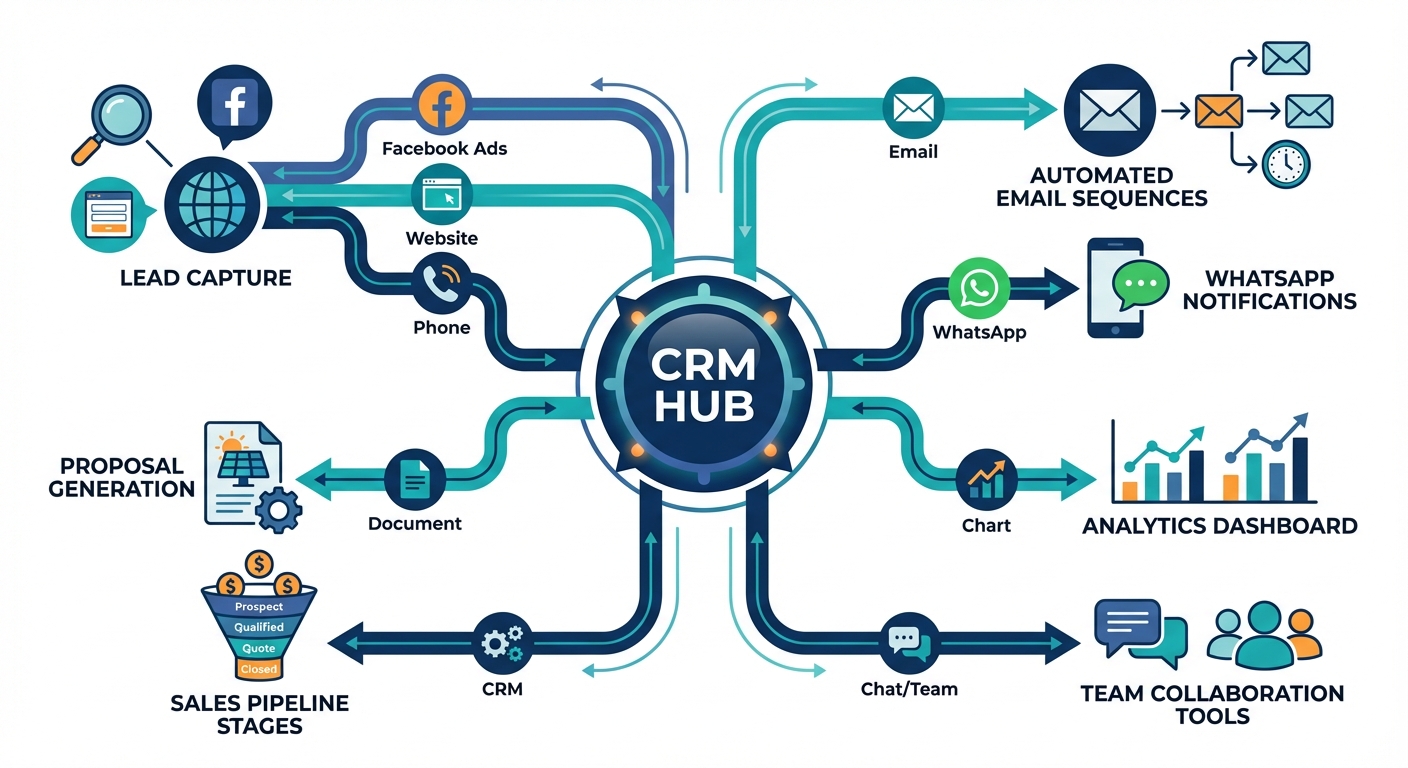
The true power of CRM implementation emerges when you automate repetitive tasks that currently consume your team’s time. Proper workflow automation transforms your CRM from a database into an active sales assistant that works 24/7.
Configure Automated Follow-Up Sequences
Set up automated follow-up workflows that trigger based on customer actions or inactions. For example, when a proposal is sent, automatically schedule follow-up reminders at 2 days, 5 days, and 7 days if the customer hasn’t responded. These reminders ensure no lead falls through the cracks due to forgotten follow-ups.
Create different follow-up sequences for different scenarios: new leads get an immediate welcome message and qualification call scheduling, site survey completions trigger proposal creation reminders, and lost leads enter a long-term nurture sequence for future remarketing.
For solar businesses in India, timing matters. Configure follow-ups to respect business hours and avoid late-night messages. Schedule WhatsApp and email communications for 10 AM to 7 PM when customers are most likely to engage.
Set Up Lead Assignment Rules
Configure automatic lead distribution rules so new inquiries are immediately assigned to the right salesperson. Common assignment methods include round-robin distribution (leads rotate evenly among team members), geographic assignment (leads go to reps covering that territory), or source-based assignment (Facebook leads go to digital specialists).
For solar companies operating across multiple Indian states, geographic assignment ensures customers work with representatives familiar with local electricity boards, subsidy programs, and installation regulations.
Create Email Templates for Common Scenarios
Develop professional email templates for frequent communications: initial inquiry response, proposal delivery, follow-up messages, site survey confirmation, installation scheduling, payment reminders, and post-installation check-ins. Templates ensure consistent messaging while dramatically reducing the time spent composing emails.
Personalize templates with merge fields that automatically insert customer name, project details, and specific information, making automated emails feel personal rather than robotic.
Integrate with Existing Tools
Connect your CRM with other business systems to eliminate duplicate data entry and create seamless workflows. Common integrations for solar companies include:
- Accounting software: Sync customer data and invoices with Tally, QuickBooks, or Zoho Books
- Marketing platforms: Connect Facebook Ads and Google Ads for automatic lead capture
- Communication tools: Integrate email, WhatsApp Business API, and phone systems
- Design software: Link with solar design tools for seamless proposal creation
- Document storage: Connect with Google Drive or Dropbox for contract and document management
QuickEst offers integration capabilities with Facebook Ads, Pabbly Connect (which bridges to 1000+ apps), and phonebook sync, enabling solar companies to build comprehensive automation without technical expertise.
Set Up Notification and Reminder Systems
Configure notifications that keep your team informed without overwhelming them. Set up alerts for high-priority events: new lead assignments, customer responses to proposals, deals moving to negotiation stage, and approaching follow-up deadlines.
Enable mobile push notifications so field sales teams receive updates in real-time, even when they’re not actively using the CRM. This immediate awareness enables faster response times, which directly impacts conversion rates in India’s competitive solar market.
Configure Reporting Dashboards for Sales Analytics
Set up dashboards that provide at-a-glance visibility into key metrics: leads by source, conversion rates by stage, average deal size, sales cycle length, individual and team performance, and revenue forecasts. These analytics transform gut-feel management into data-driven decision making.
Create role-specific dashboards, sales reps see their personal pipeline and targets, while managers view team-wide performance and bottlenecks. This targeted visibility ensures everyone has the information they need without information overload.
5. Team Onboarding and Training
Even the most perfectly configured CRM fails if your team doesn’t adopt it. User resistance is the number one reason CRM implementations fail in India and globally. Effective training and change management are as important as technical setup.
Develop Role-Specific Training Programs
Create training materials tailored to different roles rather than one-size-fits-all sessions. Sales representatives need to master lead management, proposal creation, and mobile app usage. Sales managers require training on reporting, pipeline management, and team performance tracking. Administrative staff need to understand data entry, customer service workflows, and system maintenance.
Focus training on “what’s in it for me” rather than just features. Show sales reps how the CRM helps them close more deals and spend less time on paperwork. Demonstrate to managers how real-time visibility prevents surprises and helps them coach more effectively.
Create Documentation and Quick Reference Guides
Develop simple, visual quick-reference guides for common tasks: how to add a new lead, how to create a proposal, how to update deal stage, how to schedule follow-ups. These one-page guides should be accessible from desktops and mobile devices so team members can quickly refresh their memory without interrupting their workflow.
Record short video tutorials (2-3 minutes each) demonstrating key processes. Many people learn better from watching than reading, and videos can be reviewed repeatedly as needed.
Conduct Hands-On Training Sessions
Schedule interactive training sessions where team members practice using the CRM with real scenarios from your solar business. Have them add leads, create proposals, update pipeline stages, and set follow-up reminders using practice data that mirrors actual customer situations.
For CRM implementation India projects, consider conducting training in regional languages if your team is more comfortable in Hindi, Tamil, Telugu, or other local languages. The goal is understanding and adoption, not demonstrating English proficiency.
Set Up Practice Environment for Team Learning
If possible, create a sandbox or practice environment where team members can experiment without fear of breaking anything or corrupting real customer data. This safe space encourages exploration and builds confidence before working with actual leads and customers.
Alternatively, use test records clearly labeled as “PRACTICE” so team members can learn by doing without impacting real business data.
Assign CRM Champions Within Each Team
Identify enthusiastic early adopters who can serve as peer mentors and champions. These individuals receive extra training and become the go-to resources when colleagues have questions. Peer support is often more effective than formal help desk support because champions understand the specific context and challenges of your solar business.
Recognize and reward champions for their support role, their advocacy is critical to driving adoption across your organization.
Address Resistance to Change Proactively
Expect resistance and address it directly. Common objections include “the old system works fine,” “I don’t have time to learn new software,” and “this will just create more work.” Counter these concerns by demonstrating quick wins, showing time savings, and involving skeptics in the implementation process so they feel ownership rather than imposition.
Share success stories from other solar companies that have successfully implemented CRM systems. When team members see peers achieving better results, resistance typically decreases.
6. Testing and Quality Assurance
Before rolling out your CRM to the entire team, thorough testing prevents embarrassing failures and builds confidence in the system. This quality assurance phase catches configuration errors, workflow gaps, and usability issues while they’re still easy to fix.
Run Pilot Program with Small Team First
Select 2-4 team members to use the CRM exclusively for 1-2 weeks before full rollout. Choose a mix of tech-savvy early adopters and typical users who represent your broader team. This pilot group tests the system under real working conditions and provides valuable feedback.
During the pilot, monitor usage closely. Are team members actually using the mobile app in the field? Are proposals being generated correctly? Are automated follow-ups triggering as expected? This real-world testing reveals issues that theoretical testing misses.
Test All Workflows and Automations
Systematically test every automated workflow you’ve configured. Create test leads and move them through your entire sales pipeline, verifying that notifications trigger correctly, follow-up reminders appear on schedule, and data flows between integrated systems as expected.
Test edge cases and error scenarios: What happens if someone enters an invalid phone number? How does the system handle duplicate leads? What occurs if a proposal is sent to an email address that bounces? Identifying these scenarios now prevents confusion later.
Verify Proposal Generation and Delivery
Create multiple test proposals covering different scenarios: small residential systems, large commercial installations, projects with battery backup, and proposals with various financing options. Verify that calculations are accurate, GST is applied correctly, and documents are professionally formatted.
Test proposal delivery via both email and WhatsApp. Confirm that proposals display correctly on mobile devices, as many Indian customers will review them on smartphones. Check that links work, images load, and formatting remains intact across different devices and email clients.
Check Mobile App Functionality
Since field sales teams rely heavily on mobile access, thoroughly test the mobile app on both Android and iOS devices. Verify that all critical functions work smoothly: adding leads, updating deal stages, creating proposals, accessing customer history, and receiving notifications.
Test mobile functionality under real field conditions, including areas with poor internet connectivity. Your CRM should handle intermittent connections gracefully, queuing updates to sync when connectivity returns.
Test Integrations and Data Sync
If you’ve configured integrations with Facebook Ads, accounting software, or other systems, test that data flows correctly in both directions. Create a test lead in Facebook Ads and verify it appears in your CRM. Generate a test invoice and confirm it syncs to your accounting system.
Check sync timing, are updates happening in real-time or on a schedule? Ensure team members understand any delays so they don’t make decisions based on outdated information.
Gather Feedback and Make Adjustments
Collect detailed feedback from your pilot team through surveys, interviews, and observation. Ask specific questions: What tasks took longer than expected? What features were confusing? What would make the system more useful? What’s working well?
Prioritize feedback into must-fix issues (blocking adoption), should-fix improvements (enhancing usability), and nice-to-have enhancements (future optimization). Address must-fix items before full rollout, schedule should-fix improvements for the first month, and add nice-to-have features to your long-term roadmap.
7. Go-Live and Post-Implementation Support
The go-live moment is exciting but also critical. How you manage the transition from old systems to your new CRM significantly impacts long-term adoption and success. This phase requires careful planning, clear communication, and readily available support.
Plan Phased Rollout vs. Full Deployment
Decide whether to deploy to everyone simultaneously or roll out in phases. Phased rollout (by team, region, or function) reduces risk and allows you to refine processes based on early feedback. Full deployment gets everyone on the same system immediately, avoiding the complexity of maintaining parallel systems.
For most solar companies in India, a phased approach works better. Start with your most tech-savvy team or a single geographic region, prove success, then expand. This builds momentum and creates internal success stories that encourage adoption in subsequent phases.
Monitor System Performance and User Adoption
Track adoption metrics closely during the first 30 days: login frequency, leads added, proposals created, pipeline updates, and mobile app usage. These metrics reveal whether team members are actually using the CRM or reverting to old habits.
Set minimum usage expectations and follow up individually with team members who aren’t engaging. Often, low adoption indicates confusion or technical issues rather than resistance, early intervention prevents these individuals from falling too far behind.
Provide Ongoing Support Channels
Establish clear support channels for questions and issues: a dedicated Slack or WhatsApp group, regular office hours where the implementation team is available, and documentation accessible from within the CRM. Fast, helpful responses to questions during the critical first weeks determine whether team members persist through the learning curve or give up.
For CRM implementation India projects, ensure support is available during Indian business hours. If you’re using a CRM vendor, verify their support team operates in compatible time zones and understands the Indian market context.
Schedule Regular Check-Ins with Team
Conduct brief daily check-ins during the first week, then weekly for the first month. Use these sessions to address common questions, share tips and shortcuts, celebrate wins, and gather ongoing feedback. These touchpoints demonstrate leadership commitment and keep momentum strong.
Create a safe environment where team members can admit confusion or frustration without judgment. The goal is problem-solving, not blame.
Track KPIs and Success Metrics
Monitor the success metrics you defined during planning. Are you achieving the goals you set for proposal creation time, follow-up rates, and conversion improvements? Track both leading indicators (system usage, data quality) and lagging indicators (sales results, customer satisfaction).
Share progress transparently with the team. When people see concrete improvements—”Our average proposal time dropped from 90 minutes to 4 minutes” or “We’re following up with 95% of leads within 24 hours now”—it reinforces the value of their effort in learning the new system.
Continuous Optimization Based on Usage Data
Use the first 60-90 days as a learning period. Analyze which features are heavily used and which are ignored. Simplify or remove unused features to reduce complexity. Enhance popular features based on user feedback. Add new automations as you identify repetitive tasks that could be streamlined.
CRM implementation isn’t a one-time project, it’s an ongoing process of refinement. The most successful solar companies treat their CRM as a living system that evolves with their business needs.
Best Practices for Successful CRM Adoption in India
Beyond the technical implementation steps, certain best practices significantly increase the likelihood of long-term CRM success for solar companies in India. These principles apply regardless of which CRM platform you choose.

Start Simple and Add Complexity Gradually
Resist the temptation to configure every possible feature and automation from day one. Start with core functionality, lead management, proposal creation, and basic pipeline tracking. Once your team masters these fundamentals, gradually introduce advanced features like complex automations, detailed reporting, and sophisticated integrations.
This incremental approach prevents overwhelming users and allows them to build confidence through early wins before tackling more complex capabilities.
Ensure Mobile Accessibility for Field Teams
In India’s solar market, sales professionals spend significant time in the field conducting site surveys, meeting customers, and closing deals. Your CRM must work seamlessly on mobile devices with intuitive interfaces optimized for small screens and touch interaction.
Prioritize mobile training and ensure field teams can perform all critical tasks from their smartphones: accessing customer information, creating proposals on-site, updating deal status, and scheduling follow-ups. Mobile accessibility isn’t optional, it’s essential for adoption among field sales teams.
Maintain Data Quality Standards
Establish and enforce data quality standards from day one. Require complete information for key fields, use dropdown menus instead of free text where possible to ensure consistency, and regularly audit data for duplicates and errors. Poor data quality undermines trust in the system and leads to abandonment.
Assign someone to be the data quality champion who monitors for issues and provides coaching when team members develop bad data entry habits.
Celebrate Early Wins to Build Momentum
Actively look for and publicize success stories during the first weeks and months. When a sales rep closes a deal faster because of quick proposal generation, share that story. When a manager identifies a bottleneck through pipeline analytics, celebrate that insight. When automated follow-ups recover a lead that would have been lost, highlight that win.
These stories create positive momentum and demonstrate tangible value, encouraging broader adoption and deeper engagement with the system.
Regular Training Refreshers and Updates
Don’t treat training as a one-time event. Schedule monthly refresher sessions covering advanced features, new capabilities, and best practices. As your CRM evolves and you add new automations or integrations, ensure team members understand how to leverage these enhancements.
Create a culture of continuous learning where exploring and mastering the CRM is valued and rewarded.
Leverage Vendor Support and Resources
Take full advantage of support resources provided by your CRM vendor. Most platforms offer training materials, webinars, knowledge bases, and customer success teams. For specialized solar CRM platforms like QuickEst, vendor support teams understand the specific challenges of solar businesses in India and can provide targeted guidance.
Don’t struggle alone with configuration questions or optimization challenges, vendor support teams have seen hundreds of implementations and can share proven solutions.
Common CRM Implementation Challenges and Solutions
Even with careful planning, CRM implementation India projects encounter predictable challenges. Understanding these common obstacles and their solutions helps you navigate them successfully.
Low User Adoption
Challenge: Team members continue using old methods (spreadsheets, notebooks) instead of the CRM, leading to incomplete data and system failure.
Solutions: Make CRM usage non-negotiable by tying it to performance reviews and compensation. Demonstrate quick wins that save time. Provide excellent support during the learning curve. Identify and address specific barriers preventing adoption, often it’s confusion about specific tasks rather than general resistance. Ensure leadership uses the CRM visibly and consistently.
Data Quality Issues
Challenge: Incomplete records, duplicate entries, inconsistent formatting, and outdated information undermine system usefulness and trust.
Solutions: Establish clear data entry standards and train team members on their importance. Use required fields and validation rules to enforce quality at entry. Implement regular data audits and cleanup sessions. Assign data quality ownership to specific individuals. Use automation to reduce manual entry where possible. Make data quality a team priority, not just an IT concern.
Integration Complications
Challenge: Connecting CRM with existing systems (accounting, marketing, design tools) proves more complex than anticipated, causing delays and frustration.
Solutions: Start with the most critical integration and perfect it before adding others. Use integration platforms like Pabbly Connect or Zapier to bridge systems without custom development. Work closely with vendor support teams who have integration experience. Test integrations thoroughly before relying on them for business-critical processes. Have backup manual processes ready if integrations fail.
Customization Overload
Challenge: Over-customizing the CRM creates complexity that confuses users and makes the system difficult to maintain and upgrade.
Solutions: Follow the “start simple” principle and only customize what directly addresses documented pain points. Question whether each customization is truly necessary or just nice-to-have. Use standard features wherever possible before creating custom solutions. Document all customizations thoroughly. Regularly review and remove customizations that aren’t being used.
Budget Overruns
Challenge: Implementation costs exceed initial estimates due to unexpected customization needs, extended timelines, or additional integration requirements.
Solutions: Build a 20-30% contingency into your initial budget. Choose CRM platforms designed for solar businesses to minimize customization needs. Prioritize must-have features for initial implementation and defer nice-to-have enhancements. Consider phased implementation to spread costs over time. Leverage vendor implementation services rather than expensive consultants. Track spending closely and adjust scope if approaching budget limits.
Maximize Your CRM Investment from Day One
Successful CRM implementation India transforms how solar companies operate, enabling them to manage more leads, close deals faster, and scale efficiently in India’s competitive market. The difference between companies that achieve these results and those that abandon their CRM investment lies in following a structured implementation approach.
By investing time in thorough planning, careful data migration, thoughtful customization for the Indian solar market, comprehensive team training, and ongoing optimization, your solar business can achieve the productivity gains and sales improvements that make CRM implementation worthwhile. Remember that implementation is a journey, not a destination, the most successful companies continuously refine their CRM usage based on real-world experience and changing business needs.
The solar market in India presents tremendous opportunities in 2026 and beyond. Companies equipped with efficient CRM systems that automate proposals, ensure consistent follow-ups, and provide real-time pipeline visibility will capture a disproportionate share of this growth. Your investment in proper CRM implementation today positions your solar business for sustainable success tomorrow.
Ready to transform your solar business with a CRM built specifically for the Indian market? QuickEst offers solar companies the tools to generate professional proposals in 60 seconds, automate follow-ups, and manage leads efficiently, all with India-specific customization including GST compliance, WhatsApp integration, and mobile-first design. Start with our FREE PLAN – ₹0 to experience the platform risk-free, or accelerate your growth with our PRO PLAN – ₹6999 Per User / Year that includes advanced automation and unlimited proposals. Take the first step toward successful CRM implementation India today and unlock your solar sales potential.
This blog post was written using thestacc.com