

Choosing the right CRM can make or break your solar installation business. With India’s solar market projected to reach unprecedented growth in 2026, solar companies face fierce competition for every lead. The difference between closing deals in 60 seconds versus losing prospects to faster competitors often comes down to one critical decision: CRM selection.
Yet many solar installation companies rush into CRM decisions without proper evaluation, only to discover months later that their chosen platform lacks solar-specific features, slows down their sales team, or costs far more than anticipated. This comprehensive guide walks you through 10 essential selection criteria that will help you invest in the right solar CRM—one that matches your sales process, scales with your growth, and delivers measurable ROI.
Whether you’re a small solar EPC looking to organize your first sales pipeline or an established installation company ready to upgrade from spreadsheets, this framework will ensure you make an informed CRM selection that accelerates your sales cycle and boosts your bottom line.

Why CRM Selection Matters for Solar Installation Companies in India
The Indian solar industry is experiencing explosive growth, with residential and commercial installations increasing year over year. This boom brings opportunity—but also intensified competition. Solar installation companies across India are discovering that traditional methods of managing customer relationships through Excel spreadsheets, WhatsApp groups, and email folders simply can’t keep pace with modern sales demands.
The cost of poor CRM selection extends far beyond the subscription fee. Consider these real impacts:
- Lost revenue from missed follow-ups: Without automated reminders, sales teams forget to follow up with warm leads, allowing competitors to swoop in and close deals that should have been yours.
- Wasted time on manual proposal creation: Sales professionals spending 2-3 hours creating each solar proposal can only handle a fraction of the leads that competitors with instant proposal generation can manage.
- Poor visibility into sales performance: Management teams flying blind without real-time analytics can’t identify bottlenecks, coach underperforming team members, or capitalize on successful strategies.
- Team frustration and turnover: Sales professionals forced to use clunky, complicated CRM systems become demotivated and may leave for competitors with better tools.
On the flip side, the right CRM selection transforms your solar business. Companies that choose solar-specific CRM platforms report 30-50% increases in conversion rates, dramatic reductions in sales cycle length, and significantly improved team productivity. Your CRM becomes the central nervous system of your sales operation—capturing every lead, tracking every interaction, and ensuring no opportunity slips through the cracks.
The key is knowing exactly what to look for. Let’s dive into the 10 essential criteria that separate exceptional solar CRMs from disappointing investments.
1. Industry-Specific Features for Solar Businesses
The first and most critical criterion in your CRM selection process is evaluating whether the platform is purpose-built for solar businesses or merely a general CRM that claims to work for any industry. This distinction matters enormously.
General-purpose CRMs like Salesforce or Zoho CRM offer powerful features, but they’re designed to serve every industry from real estate to manufacturing. For solar installation companies, this means you’ll need extensive customization, third-party integrations, or workarounds to handle solar-specific workflows. That customization comes with costs—both in implementation fees and ongoing maintenance.
Solar-specific features to prioritize during CRM selection:
- Solar proposal templates: Pre-built templates that understand solar system sizing, panel specifications, inverter options, and installation costs specific to the Indian market.
- Solar calculation engines: Built-in tools that calculate system size based on customer electricity consumption, roof area, and sunlight hours without requiring external spreadsheets.
- Equipment databases: Integrated catalogs of solar panels, inverters, batteries, and mounting systems with current pricing and specifications.
- Solar-specific pipeline stages: Sales stages that reflect the solar customer journey—from site survey to proposal to financing approval to installation scheduling.
- ROI and payback calculators: Tools that help customers understand their investment returns, a critical component of solar sales conversations.
Platforms like QuickEst are built specifically for solar businesses, offering proposal generation within 60 seconds using solar-specific templates and workflows. This specialization means your team can start closing deals immediately rather than spending weeks or months customizing a general CRM.
Red flag to avoid: If a CRM vendor can’t show you solar-specific features out of the box and instead promises “we can customize it for you,” be wary. Customization projects often run over budget, take longer than expected, and create ongoing maintenance headaches.
2. Proposal Generation Speed and Quality
In solar sales, speed kills—the competition, that is. The solar installation company that can deliver a professional, accurate proposal while the customer is still interested wins the deal. Customers comparing multiple solar providers rarely wait days for quotes; they move forward with whoever responds fastest.
During your CRM selection process, proposal generation capabilities should be a top priority. Evaluate these specific features:
Speed of proposal creation: Can your sales team generate a complete solar proposal in minutes, or does the process require extensive data entry and manual calculations? The best solar CRMs enable proposal creation in under 5 minutes—some, like QuickEst, can do it in 60 seconds.
Professional presentation quality: Your proposals represent your brand. Look for CRMs that offer:
- Customizable templates with your company logo, colors, and branding
- Professional layouts that clearly present system specifications, costs, and savings
- Visual elements like system diagrams, roof layouts, and savings charts
- Mobile-responsive formats that look great on any device
Multi-channel delivery options: In the Indian market, WhatsApp is often the preferred communication channel for business. Your CRM should enable instant proposal delivery via:
- WhatsApp Business integration for immediate sharing
- Email with professional formatting
- SMS with proposal links for customers on the go
- Downloadable PDFs for customers who want to save and review offline
Template library and reusability: Does the CRM offer a library of proposal templates for different customer segments (residential, commercial, industrial)? Can you save and reuse successful proposals as templates for similar projects? This feature dramatically accelerates proposal creation for repeat scenarios.
The ROI of fast proposal generation is substantial. If your sales team handles 50 leads per month and can reduce proposal creation time from 2 hours to 5 minutes, you’ve freed up approximately 160 hours of selling time monthly—time that can be redirected to lead generation, customer meetings, and closing deals.
3. Mobile Accessibility for Field Sales Teams
Solar sales happen in the field—at customer homes, on rooftops during site surveys, at trade shows, and during evening appointments when customers are available. A CRM that chains your sales team to their office desks is a CRM that will handicap your competitive position.
Mobile accessibility must be a non-negotiable criterion in your CRM selection process. Here’s what to evaluate:
Native mobile apps for iOS and Android: Web-responsive interfaces are better than nothing, but native mobile apps offer superior performance, offline functionality, and user experience. Verify that the CRM offers dedicated apps for both major mobile platforms.
Full feature parity: Some CRMs offer mobile apps that only provide limited functionality—viewing contacts and deals but not creating proposals or updating pipeline stages. Your mobile app should enable your sales team to:
- Create and send proposals from their smartphone
- Capture new leads with photo and contact information
- Update deal stages and add notes after customer meetings
- Access customer history and previous interactions
- Set follow-up reminders and tasks
- View real-time sales analytics and team performance
Offline functionality: Internet connectivity isn’t always reliable, especially in rural areas where many solar installations occur. The best CRMs offer offline modes that sync data automatically when connectivity returns, ensuring your team never loses information.
Real-world scenario: Imagine your sales representative completes a site survey at a customer’s home. With robust mobile CRM access, they can immediately create a customized solar proposal on their tablet, review it with the customer on the spot, send it via WhatsApp, and potentially close the deal before leaving the property. Without mobile access, they’d need to return to the office, recreate the proposal from memory and notes, and follow up days later—by which time the customer may have already chosen a competitor.
During your CRM selection evaluation, test the mobile apps extensively. Have your sales team use them in real-world conditions to identify any limitations or frustrations before committing.
4. Lead Management and Sales Pipeline Tracking
Effective lead management separates thriving solar businesses from struggling ones. Every inquiry—whether from your website, Facebook ads, referrals, or trade shows—represents potential revenue. The question is whether your CRM can capture, organize, prioritize, and nurture those leads efficiently.
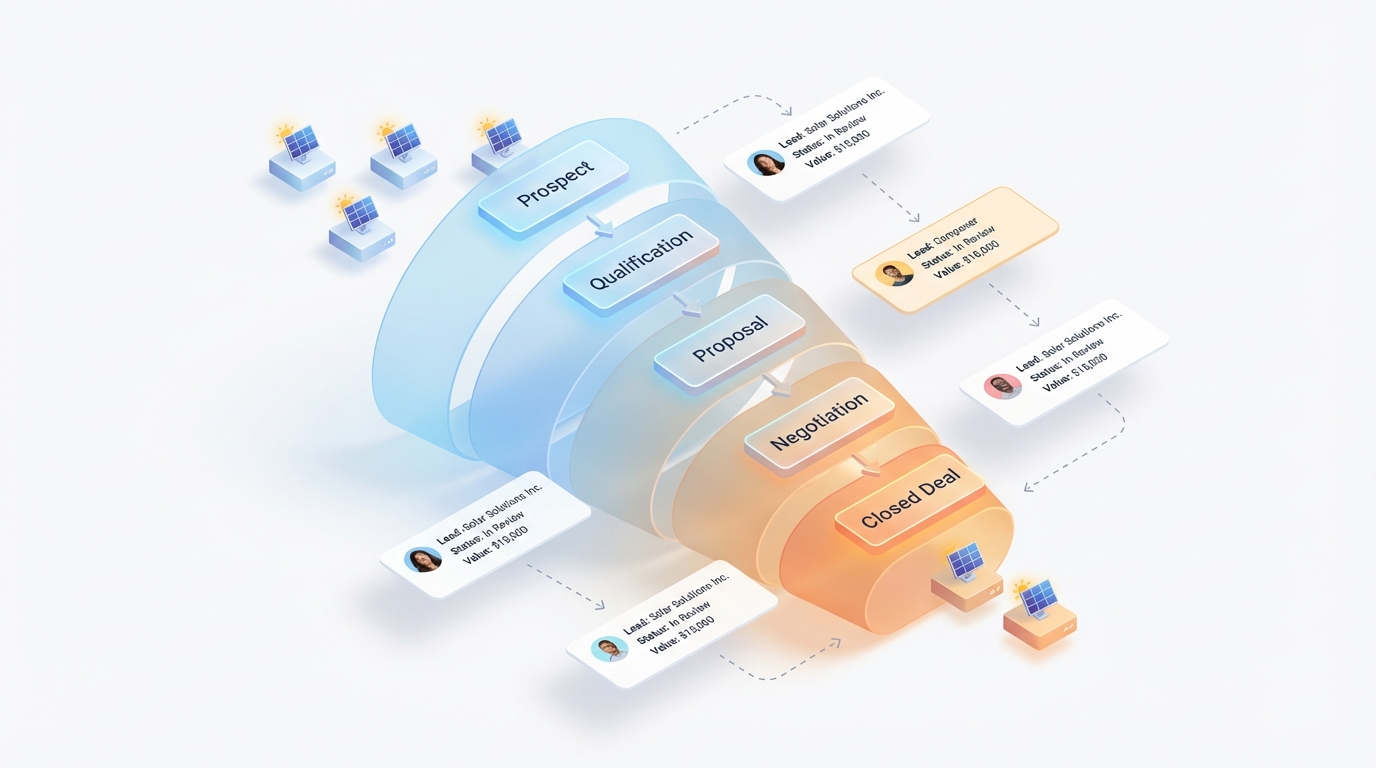
When evaluating CRM selection options, scrutinize these lead management capabilities:
Multi-source lead capture: Your leads come from diverse channels. Your CRM should automatically capture leads from:
- Website contact forms and chat widgets
- Facebook Lead Ads and other social media campaigns
- Manual entry from phone calls and walk-ins
- Bulk imports from Excel spreadsheets or existing databases
- Referral tracking systems
- Trade show and event registrations
Integration with lead sources eliminates manual data entry and ensures no lead falls through the cracks. QuickEst, for example, offers direct integration with Facebook Ads and bulk import functionality, making it easy to centralize all your leads regardless of origin.
Lead scoring and prioritization: Not all leads are created equal. Advanced CRMs offer lead scoring based on factors like:
- Budget indicators and project size
- Timeline urgency (ready to install now vs. researching for next year)
- Engagement level (opened proposals, clicked links, responded to follow-ups)
- Lead source quality (referrals typically convert better than cold inquiries)
Lead scoring helps your sales team focus energy on the highest-probability opportunities rather than treating every inquiry equally.
Visual pipeline management: The best CRMs provide intuitive visual representations of your sales pipeline—typically a kanban-style board showing deals moving through stages like:
- New Lead
- Qualified Prospect
- Site Survey Scheduled
- Proposal Sent
- Negotiation
- Contract Signed
- Installation Scheduled
This visualization gives sales managers instant insight into pipeline health, identifies bottlenecks (too many deals stuck in “Proposal Sent” suggests follow-up issues), and enables accurate revenue forecasting.
Automated lead nurturing: Leads that aren’t ready to buy today still have value—if you stay in touch. Look for CRMs with automated nurturing sequences that send educational content, case studies, and periodic check-ins to keep your company top-of-mind until prospects are ready to move forward.
The lead management capabilities you choose during CRM selection directly impact your conversion rates. A well-organized pipeline with automated follow-ups can increase conversion rates by 30% or more compared to manual, disorganized lead tracking.
5. Integration Capabilities with Existing Tools
Your CRM doesn’t exist in isolation—it needs to work harmoniously with your existing business tools. Poor integration capabilities force your team into time-consuming manual data entry, create data silos, and limit the value you can extract from your technology investments.
During CRM selection, evaluate integration capabilities across these categories:
Marketing and lead generation integrations: Your CRM should connect seamlessly with the platforms you use to generate leads:
- Facebook Lead Ads: Automatic lead capture from Facebook campaigns directly into your CRM
- Google Ads: Tracking which campaigns generate the highest-quality solar leads
- Email marketing platforms: Syncing contact lists and tracking email engagement
- Website forms: Instant lead capture from your website inquiries
Communication tool integrations: In India, WhatsApp dominates business communication. Your CRM should offer:
- WhatsApp Business integration: Send proposals, follow-ups, and updates directly through WhatsApp
- Email integration: Track email opens, clicks, and responses within the CRM
- SMS capabilities: Automated text reminders for appointments and follow-ups
- Phone system integration: Automatic call logging and click-to-dial functionality
Accounting and invoicing integrations: Once you close a deal, your CRM should connect with your accounting software to streamline invoicing and payment tracking. Look for integrations with popular platforms like Tally, Zoho Books, or QuickBooks.
Automation platforms: Tools like Pabbly Connect, Zapier, or Integromat enable you to create custom workflows connecting your CRM with hundreds of other applications. QuickEst offers Pabbly Connect integration, giving you flexibility to build custom automation workflows tailored to your specific business processes.
API availability: For more technical teams or unique integration needs, check whether the CRM offers a robust API (Application Programming Interface) that allows custom integrations with proprietary systems or specialized solar design software.
Data migration support: If you’re switching from an existing CRM or consolidating data from multiple sources, evaluate the vendor’s data migration support. Do they offer migration services? Can you easily import your existing customer database, deal history, and notes?
The integration capabilities you prioritize during CRM selection should align with your current technology stack and future growth plans. A CRM that plays well with others multiplies its value by creating a unified, automated sales ecosystem.
6. Automation Features to Boost Sales Efficiency
The primary purpose of CRM selection is finding a platform that makes your sales team more efficient—enabling them to handle more leads, close more deals, and waste less time on administrative tasks. Sales automation is where this efficiency materializes.
Automated follow-up systems: Following up consistently is one of the most challenging aspects of sales. Research shows that 80% of sales require five or more follow-ups, yet most salespeople give up after just two attempts. Automated follow-up features solve this problem:
- Customizable reminder sequences: Set up automatic reminders to follow up with prospects at optimal intervals (3 days after proposal, 1 week later, 2 weeks later, etc.)
- Email templates and sequences: Pre-written follow-up emails that send automatically, personalized with customer details
- Task automation: Automatic task creation when deals move to new pipeline stages (e.g., “Schedule site survey” task created when lead is qualified)
- WhatsApp follow-up automation: Scheduled WhatsApp messages to check in with prospects
QuickEst’s automated follow-up system ensures no lead goes cold due to forgotten follow-ups, dramatically improving conversion rates without requiring superhuman memory from your sales team.
Workflow automation: Beyond follow-ups, look for CRMs that automate repetitive workflows:
- Lead assignment rules: Automatically assign new leads to sales representatives based on territory, workload, or specialization
- Deal stage automation: Automatically move deals to the next stage when certain actions are completed
- Notification triggers: Alert team members when important events occur (proposal opened, contract signed, payment received)
- Data enrichment: Automatically populate contact information from phone numbers or email addresses
Calculating automation ROI: Consider a solar sales team of 5 people. If automation saves each person just 1 hour per day on administrative tasks, that’s 25 hours per week—more than 100 hours per month—redirected to revenue-generating activities. At an average close rate and deal size, this time savings can translate to lakhs of rupees in additional monthly revenue.
During your CRM selection process, ask vendors for specific examples of automation workflows relevant to solar businesses. Test these automation features during trial periods to ensure they actually save time rather than adding complexity.
7. Pricing Models and Total Cost of Ownership
CRM pricing can be deceptively complex. The advertised subscription fee is just the starting point—the true cost of ownership includes implementation, training, customization, integrations, and ongoing support. Smart CRM selection requires understanding the complete financial picture.
Common CRM pricing models:
- Per-user, per-month: Most CRMs charge monthly fees per user, typically ranging from ₹500 to ₹5,000+ per user depending on features and vendor
- Per-user, per-year: Annual billing often comes with discounts of 10-20% compared to monthly billing
- Tiered pricing: Different feature sets at different price points (Basic, Professional, Enterprise)
- Freemium models: Free plans with limited features or user counts, with paid upgrades for advanced capabilities
QuickEst offers transparent pricing with a FREE PLAN – ₹0 for businesses just getting started, and a PRO PLAN – ₹6999 Per User / Year that includes full access to proposal generation, automation, and mobile apps—making it one of the most cost-effective solar-specific CRM options in India.
Hidden costs to watch for during CRM selection:
- Implementation fees: Some vendors charge thousands or lakhs for setup and configuration
- Training costs: Per-user training fees or mandatory training packages
- Customization charges: Fees for custom fields, workflows, or reports
- Integration costs: Charges for connecting to other tools or API access
- Data migration fees: Costs to import your existing customer data
- Support tiers: Basic support included, but premium support (faster response times, dedicated account manager) costs extra
- User minimums: Some enterprise CRMs require minimum user commitments (e.g., must purchase at least 10 licenses)
- Storage limits: Additional fees when you exceed data storage limits
Calculating CRM ROI: To justify CRM investment, calculate expected return on investment:
- Increased conversion rate: If CRM improves your conversion rate from 10% to 15%, and you handle 100 leads monthly at ₹2 lakh average deal size, that’s an additional ₹10 lakh monthly revenue (5 extra deals × ₹2 lakh)
- Time savings: If automation saves 2 hours per day per salesperson, and you have 5 salespeople, that’s 200 hours monthly that can be redirected to revenue generation
- Reduced customer acquisition cost: Better lead management and follow-up reduces wasted marketing spend on leads that slip through the cracks
Even a CRM costing ₹50,000 annually delivers exceptional ROI if it generates just one additional deal per month.
Scalability considerations: During CRM selection, project your growth. If you have 3 users today but plan to grow to 10 users within two years, how does pricing scale? Some CRMs become prohibitively expensive as you add users, while others offer volume discounts or flat-rate pricing for small teams.
Free trials and guarantees: Prioritize CRMs that offer free trials (14-30 days) so you can test thoroughly before committing. Money-back guarantees provide additional protection against poor CRM selection decisions.
8. Real-Time Analytics and Performance Tracking
You can’t improve what you don’t measure. The right CRM transforms your sales operation from guesswork to data-driven decision-making by providing real-time visibility into every aspect of your sales performance.
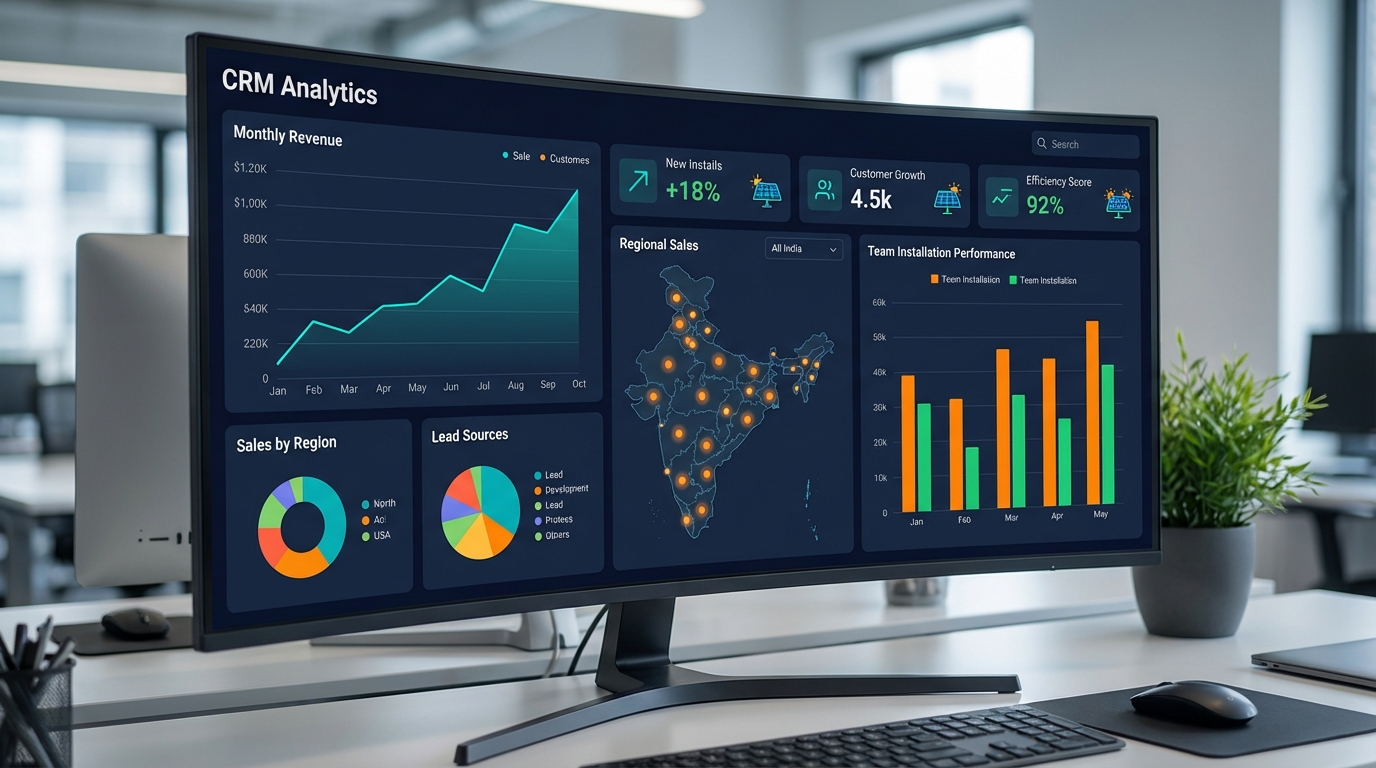
During CRM selection, evaluate these analytics and reporting capabilities:
Sales dashboard and KPI visualization: Your CRM should provide an at-a-glance dashboard showing critical metrics:
- Pipeline value: Total value of all deals in your pipeline
- Conversion rates: Percentage of leads that become customers at each pipeline stage
- Average deal size: Mean value of closed deals
- Sales cycle length: Average time from first contact to closed deal
- Win/loss ratio: Percentage of proposals that convert to sales
- Revenue forecasting: Projected revenue based on pipeline probability
QuickEst provides real-time sales analytics that give solar business owners instant visibility into team performance and pipeline health, enabling proactive management rather than reactive problem-solving.
Individual and team performance tracking: Sales managers need visibility into both team-wide metrics and individual performance:
- Leaderboards: Gamified displays showing top performers
- Activity tracking: Calls made, proposals sent, meetings scheduled per salesperson
- Conversion rate by rep: Identifying who needs coaching and who should be mentoring others
- Territory performance: Which geographic areas or customer segments perform best
Custom reporting capabilities: Pre-built reports are helpful, but your business has unique questions. Look for CRMs that allow custom report creation:
- Filter and segment data by date range, lead source, product type, or any custom field
- Export reports to Excel or PDF for board meetings and investor presentations
- Schedule automated report delivery (weekly pipeline summary emailed every Monday)
- Create visual charts and graphs for easy interpretation
Lead source ROI analysis: Which marketing channels generate the highest-quality leads? Your CRM should track lead source and connect it to closed deals, revealing which investments (Facebook Ads, Google Ads, referral programs, trade shows) deliver the best return.
Proposal analytics: Advanced CRMs track proposal engagement—when prospects open proposals, how long they spend reviewing them, which sections they focus on. This intelligence helps sales teams time their follow-ups perfectly and understand what resonates with customers.
The analytics capabilities you prioritize during CRM selection should align with your management style and decision-making needs. If you’re a data-driven leader who makes strategic decisions based on metrics, robust analytics are non-negotiable.
9. Scalability and Team Collaboration Features
Your CRM selection should account not just for your current team size and sales volume, but for where you plan to be in 2-3 years. A CRM that works perfectly for a 3-person sales team may buckle under the weight of a 20-person organization with thousands of customers.
Supporting growth from small teams to large organizations:
- Performance at scale: Does the CRM maintain fast load times and responsiveness as your database grows from hundreds to thousands of contacts and deals?
- Pricing scalability: How does cost increase as you add users? Some CRMs offer volume discounts; others become prohibitively expensive at scale
- Feature availability: Do you need to upgrade to enterprise tiers to access features like advanced reporting or API access?
- Data limits: Are there caps on contacts, deals, or storage that you might hit as you grow?
Multi-user access and permission controls: As your team grows, you need granular control over who can access what:
- Role-based permissions: Different access levels for sales reps, managers, and administrators
- Data visibility rules: Sales reps see only their own deals, while managers see team-wide data
- Territory management: Assign leads and customers to specific reps based on geography or account type
- Audit trails: Track who made changes to deals, contacts, or settings for accountability
Team collaboration tools: Solar sales often involves multiple team members—sales reps, technical specialists, installation coordinators. Your CRM should facilitate seamless collaboration:
- Internal notes and comments: Team members can leave notes on deals visible to colleagues but not customers
- Task assignment: Assign follow-up tasks to specific team members with due dates
- @mentions and notifications: Tag colleagues to bring their attention to specific deals or questions
- Shared calendars: Coordinate site surveys and installation schedules across the team
- Deal handoffs: Smooth transitions when deals move from sales to installation teams
Multi-location support: If your solar business operates across multiple cities or states in India, your CRM should support:
- Territory-based lead assignment and reporting
- Location-specific pricing and product catalogs
- Regional performance comparisons
- Time zone handling for national operations
During CRM selection, honestly assess your growth trajectory. If you’re a small team today but have ambitious expansion plans, choose a CRM that can grow with you rather than one you’ll outgrow in 18 months.
10. Data Security and Compliance
Your CRM contains some of your most sensitive business assets—customer contact information, deal values, pricing strategies, and competitive intelligence. A data breach or loss could devastate your business reputation and violate customer trust. Data security must be a critical factor in your CRM selection process.
Encryption standards: Look for CRMs that implement industry-standard encryption:
- TLS 1.2 or higher: Encrypts data in transit between users and servers
- 256-bit AES encryption: Protects data at rest on servers
- End-to-end encryption: Ensures even the CRM provider can’t access your unencrypted data
QuickEst implements TLS 1.2 and 256-bit AES encryption, providing bank-level security for your customer data and business information.
Data backup and disaster recovery: What happens if the CRM provider experiences a server failure or natural disaster?
- Automated backups: Daily or more frequent automatic backups of all your data
- Geographic redundancy: Data stored in multiple locations to prevent loss from localized disasters
- Recovery time objectives: How quickly can the vendor restore service after an outage?
- Data export capabilities: Can you easily export all your data if you need to switch CRMs?
Compliance with Indian data protection regulations: With increasing focus on data privacy, ensure your CRM vendor:
- Complies with Indian data protection laws and regulations
- Stores data in India or complies with cross-border data transfer requirements
- Provides data processing agreements that clarify responsibilities
- Offers features to support customer data rights (access, deletion, portability)
User access controls and audit trails: Internal security is as important as external protection:
- Strong password requirements: Enforced password complexity and regular password changes
- Two-factor authentication: Additional security layer beyond passwords
- IP whitelisting: Restrict CRM access to specific IP addresses or locations
- Session management: Automatic logout after inactivity
- Audit logs: Track all user actions for security monitoring and compliance
Vendor reliability and uptime guarantees: Your CRM is mission-critical—downtime means lost sales opportunities. Evaluate:
- Uptime SLA: Service Level Agreement guaranteeing 99.9% uptime or better
- Historical uptime: Track record of reliability and minimal outages
- Status page: Transparent communication about system status and incidents
- Support responsiveness: How quickly does the vendor respond to and resolve issues?
During CRM selection, don’t hesitate to ask vendors detailed questions about their security practices, certifications, and incident response procedures. A vendor that’s evasive about security should be eliminated from consideration.
Red Flags to Avoid During CRM Selection
Knowing what to avoid is as important as knowing what to look for. Watch for these warning signs that should make you think twice about a CRM vendor:
Overly complex systems requiring extensive training: If the CRM requires days or weeks of training before your team can use basic features, it’s probably too complicated. The best CRMs are intuitive enough that sales professionals can start using them productively within hours.
Vendors with poor customer support: Test the vendor’s support during your evaluation:
- How quickly do they respond to inquiries?
- Are support channels limited (email only) or comprehensive (phone, chat, email)?
- Do they offer support during your business hours, accounting for time zones?
- Read reviews specifically mentioning customer support quality
Lack of solar industry experience or references: If a CRM vendor can’t provide references from other solar installation companies or case studies demonstrating solar industry expertise, they may not understand your specific needs. Ask for references and actually contact them to learn about their experience.
Rigid systems that don’t adapt to your sales process: Every solar business has unique workflows. A CRM that forces you to completely change your proven sales process to fit its rigid structure will create team resistance and reduce adoption. Look for flexible CRMs that can be configured to match how you actually sell.
Hidden fees and unclear pricing structures: If you can’t find clear pricing on the vendor’s website, or if the sales representative is evasive about total costs, be wary. Transparent vendors publish their pricing and clearly explain what’s included versus what costs extra.
Poor mobile experience or no mobile app: In 2026, mobile access is non-negotiable for field sales teams. If the mobile app is clunky, limited in functionality, or non-existent, eliminate that CRM from consideration.
No free trial or demo: Vendors confident in their product offer free trials or comprehensive demos. If a vendor pressures you to commit without thoroughly testing the platform, that’s a major red flag.
Vendor lock-in tactics: Some CRMs make it difficult or expensive to export your data if you decide to switch. During CRM selection, verify that you can easily export all your data in standard formats (CSV, Excel) at any time without fees.
Negative review patterns: A few negative reviews are normal, but watch for patterns in complaints—if multiple reviews mention the same issues (poor support, hidden fees, bugs), take those seriously.
Your Solar CRM Selection Framework: A Step-by-Step Checklist
Now that you understand the 10 essential criteria, here’s a practical framework to guide your CRM selection process:
Step 1: Define your specific requirements and pain points
Before evaluating any CRM, document your current challenges and must-have features:
- What are your biggest sales process pain points? (slow proposal creation, missed follow-ups, poor visibility, etc.)
- How many users need CRM access today? In 12 months? In 24 months?
- What’s your budget range for CRM investment?
- Which integrations are essential versus nice-to-have?
- What mobile features do your field sales team require?
- What reports and analytics do you need for decision-making?
Step 2: Create a shortlist based on solar-specific features
Research CRM options and create a shortlist of 3-5 platforms that offer solar-specific capabilities. Prioritize CRMs purpose-built for solar businesses over general platforms. Include QuickEst in your evaluation—its solar-specific features and competitive pricing make it an ideal candidate for Indian solar installation companies.
Step 3: Test with free trials and real-world scenarios
Sign up for free trials of your shortlisted CRMs. Don’t just click around—test them with real scenarios:
- Create actual solar proposals for recent customer inquiries
- Import a sample of your existing customer database
- Set up your sales pipeline stages and move deals through them
- Test the mobile app in field conditions
- Configure automation workflows for follow-ups
- Generate reports you’d actually use for decision-making
- Involve your sales team in testing and gather their feedback
Step 4: Evaluate total cost vs. expected ROI
For each CRM on your shortlist, calculate:
- Total first-year cost (subscription + implementation + training + integrations)
- Ongoing annual cost for your projected team size
- Expected ROI based on improved conversion rates and time savings
- Payback period (how many months until ROI exceeds cost)
Step 5: Check references from other solar companies
Ask vendors for references from solar installation companies similar to yours in size and market. Contact these references and ask:
- What were their main reasons for choosing this CRM?
- How long did implementation take?
- What unexpected challenges did they encounter?
- How has the CRM impacted their sales performance?
- What do they wish they’d known before selecting this CRM?
- How responsive is customer support?
- Would they choose the same CRM again?
Step 6: Assess implementation timeline and support
Before making your final CRM selection, clarify:
- How long will implementation take from purchase to full team adoption?
- What implementation support does the vendor provide?
- What training resources are available (videos, documentation, live training)?
- What ongoing support is included in your subscription?
- Is there a dedicated account manager or customer success representative?
Downloadable checklist summary:
Use this quick checklist when evaluating each CRM:
- ☐ Solar-specific features (proposal templates, calculations, equipment databases)
- ☐ Proposal generation under 5 minutes with professional quality
- ☐ Native mobile apps for iOS and Android with full functionality
- ☐ Multi-source lead capture and visual pipeline management
- ☐ Integrations with Facebook Ads, WhatsApp, and existing tools
- ☐ Automated follow-ups and workflow automation
- ☐ Transparent pricing within budget with no hidden fees
- ☐ Real-time analytics dashboard and custom reporting
- ☐ Scalability to support projected growth
- ☐ TLS and AES encryption with data backup
- ☐ Free trial completed with positive team feedback
- ☐ Positive references from similar solar companies
- ☐ Clear implementation plan and support resources
Making the Right CRM Selection for Your Solar Business
Choosing the right CRM is one of the most impactful decisions you’ll make for your solar installation business. The right platform transforms your sales operation—accelerating proposal generation, ensuring consistent follow-ups, providing real-time visibility into performance, and ultimately helping you close more deals and grow faster.
The 10 essential selection criteria we’ve covered provide a comprehensive framework for evaluating CRM options:
- Industry-specific features for solar businesses
- Proposal generation speed and quality
- Mobile accessibility for field sales teams
- Lead management and sales pipeline tracking
- Integration capabilities with existing tools
- Automation features to boost sales efficiency
- Pricing models and total cost of ownership
- Real-time analytics and performance tracking
- Scalability and team collaboration features
- Data security and compliance
Remember that CRM selection isn’t about finding the platform with the most features—it’s about finding the one that best fits your specific business needs, sales process, and growth trajectory. A solar-specific CRM like QuickEst, purpose-built for the unique workflows of solar installation companies in India, often delivers better results than general-purpose platforms that require extensive customization.
The competitive advantage of choosing the right solar CRM:
In India’s rapidly growing solar market, the companies that win are those that can respond fastest to customer inquiries, follow up most consistently, and present the most professional proposals. Your CRM is the engine that powers all of these competitive advantages. Solar businesses using specialized CRMs report:
- 30-50% improvement in lead-to-customer conversion rates
- 60-80% reduction in proposal creation time
- Dramatic increases in follow-up consistency and deal closure rates
- Significantly improved team productivity and morale
- Better visibility enabling data-driven strategic decisions
Next steps: Starting your CRM evaluation process
Don’t let analysis paralysis delay your decision. Start your CRM selection process today:
- Document your requirements using the framework in this guide
- Create your shortlist of 3-5 solar-specific CRM platforms
- Sign up for free trials and test with real-world scenarios
- Involve your sales team in evaluation and gather their feedback
- Check references from other solar installation companies
- Make your decision and commit to full implementation
QuickEst offers everything solar installation companies need to streamline their sales process—from 60-second proposal generation to automated follow-ups to real-time analytics. With a FREE PLAN – ₹0 to get started and a comprehensive PRO PLAN – ₹6999 Per User / Year, it’s designed specifically for the Indian solar market with features like WhatsApp integration and mobile-first design.
Ready to transform your solar sales process? Explore QuickEst’s solar-specific CRM features and see how the right platform can help you close more deals, faster. Contact us to schedule a personalized demo and discover why solar installation companies across India are choosing QuickEst to power their sales growth.
The right CRM selection today sets the foundation for your solar business success tomorrow. Choose wisely, implement thoroughly, and watch your sales performance soar.